
Dana and I designed and printed these shirts for the whole family for Xmas.
 RasterWeb!
Dana and I designed and printed these shirts for the whole family for Xmas.
Even before I got the Eee PC I had read through the forums and learned that you could restore it if you totally mucked it up with the included disk. Ummm, yeah, but the Eee PC does not have an optical disk drive, right?
I had found this Universal Drive Adapter while ordering something else and figured for the price I’d grab one. Once I got it I pulled the DVD drive from my dead G4 hooked it all up, and it worked. I stuck in a DVD with a photo slide show and managed to browse the files and view the images. Success!
Obviously this is not exactly a good portable solution, but if I ever do need a DVD drive connected, it’s nice to know I can do it. (Yeah, I know you can buy an external USB DVD drive, but I was more interested in a cheap solution using what I already had.)

I got XAMPP installed on the Eee PC, which wasn’t difficult, because it’s Linux and XAMPP is easy.
I had wanted to install it onto the SD card I leave in the machine, but installing into /home/user/SD-MMC/SD1GIG/opt did not work, so I ended up going for plain old /opt on the internal memory. The weird thing about putting it on the SD card was that I couldn’t set the execute bit on some files. I’ll have to look into that one… As it is, it’s in /opt/lampp now and pretty much works.

XAMPP has a little bit of warning/errors going on, but I’ll dig into that later…
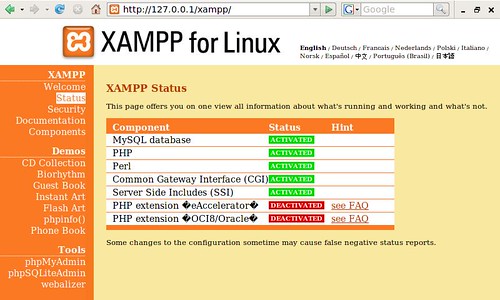
I could have installed Apache, MySQL and PHP separately, but I just wanted to get up and running quickly so XAMPP did the job. I’m hoping I’m not going to regret devoting too much space to it. I can always pare it down later if needed.
Along with XAMPP comes phpMyAdmin, which can come in handy, but on the small screen isn’t exactly optimal.

Next on the TO DO list will be installing Drupal.
Things I hate about (poorly built) Flash sites: you can’t select the text, you can’t resize the text, my scrollwheel does not work, the controls are too small, I can’t open links in a new tab/window… Basically, I hate losing all the features I am used to my browser having with an HTML site…
 I sort of feel like even if it is a crappy HTML site, at least I can still control things like the browser’s scrollbar, or the size of the text, or how links open, and my scrollwheel works! So many (crappy) Flash sites still feel like the author wants complete control over my experience, and they think they know better than everyone else what is good for you. I hate those people. Ok, I don’t really hate them, but I feel like they hate me, or at least they don’t trust me. Argh…..