Categories
Uncategorized

Processing: HTTP Request

HTTP Request

I’ve been falling behind on Processing Month, but it’s not because I haven’t been hacking away, it’s because I’ve been hitting a lot of walls, not having things work out the way I want them to. I’m trying to not just take other people’s code and go from there, but trying my best to dig through the Processing documentation and reference and figure things out. Sometimes it works… Sometimes it doesn’t.

So that “138” you see above is not very exciting at all. I started working with pulling data from the web into Processing, with the thought that I’ll have a web application output data, that Processing pulls in, and then talks to an Arduino to do… something.

So right now there is a bit of PHP that looks like the following:

<?php echo "138" ?>

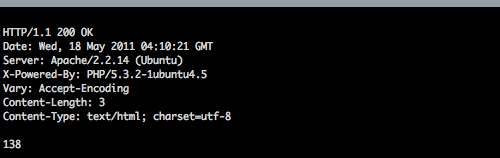
And in Processing when I call the println command it outputs this:
HTTP Request

And in draw() after we call the println command, we also call the text command which puts the “138” on the canvas.

I know… it’s fairly unexciting, but it’s a small step. Very small. I have a long way to go to get it working more reliably. Right now, we are reversing the output from the request, and grabbing the first line (index array zero) which should be the last line if we didn’t reverse it. I’m not too clear on array operations yet. (I come from the text processing world of Perl, so there’s a little culture shock in Processing.) Also, if the code outputs anything after the value, it doesn’t work. (I found this out when editing the file in nano, which seems to add an extra line at the end. Urgh)

/*
 * 20110518.pde
 */

import processing.net.*;

Client c;
String data;

void setup() {
  size(800, 600);
  background(0);
  stroke(255);
  c = new Client(this, "rasterweb.net", 80);
  c.write("GET /raster/processing/20110518.php HTTP/1.1\n");
  c.write("Host: rasterweb.net\n\n");
}

void draw() {
  
  if (c.available() > 0) {
    
    data = c.readString();
        
    println(data);
    
    String lines[] = reverse(split(data, "\n"));
    
    textAlign(CENTER);
    textSize(100);
    text(lines[0], width/2, height/2);
        
  }
}

The good news is, since I have been busy with Processing (and if all goes well) I’ll have a new interactive art piece to display at the Milwaukee Makerspace for Bay View Gallery Night.

Categories
Uncategorized

Makey Birthday!

Makey Birthday

Hey folks, it’s a month out from my birthday (June 18th is the day!) and while I typically appreciate the gifts people buy for me, this year I want to make a request, and it goes like this:

1. Make me something!

Yeah, you (together with your own two hands) should make me something. Chance are you’re creative in some way. Maybe you can knit, or draw, or paint, or write a poem or a short story, or compose a song, or take an amazing photo, or maybe you are good with tools, can work with wood, can weld, or cut paper and glue it together, or maybe you make things in the kitchen, like lovely cakes or pizza pies.

If you need some inspiration, check out some of the stuff they highlight on Make, or check out the Flickr photos in the Make or Craft pool. If you really don’t think you can make something yourself, Etsy has things that other people make.

2. Give me money.

Yeah, those are the choices. Either you make me something, or just give me money. (Any amount is fine.) Seriously. Don’t go to the store and buy some mass-produced consumer good. Just make me something, or give me money. How simple is that?

Note #1: In the event you give me money instead of making me something, the money will be used to procure things like food or gasoline.

Note #2: In the event that I get awesome handmade gifts from people, I’ll blog about them, as long as people give me permission to do so.

Categories
Uncategorized

Simple Sandbags

Typically when we do larger video shoots we hire a grip truck, and the grip truck is loaded with stands, and scrims, and lots of sandbags. Mmmmm, sandbags!

The sandbags are pretty nice. Thick canvas with strong handles, and pretty darn heavy. Of course if you make your own sandbags you can make them smaller and lighter, or bigger and heavier. Customize them as you wish!

Here’s my recipe for simple sandbags:

  • Sand
  • Plastic bags
  • An old pair of pants
  • Cord

It’s pretty simple really. Take a plastic bag, and put some sand in it. Tie it shut. Put it inside another plastic bag. (Try to get all the air out of it if possible.)

Once you have the plastic bag the size and weight you desire, find an old pair of pants. Cut the legs off. Make sure they are long enough to fit the plastic bag into.

Slide the bag inside the pant leg, and tie up the ends with some cord. That’s it.

Simple Sandbag

You could actually sew the ends shut, but then you need a sewing machine, and you need to know how to sew, and then these aren’t really “simple” sandbags anymore.

These also don’t have any handles, but again, we’ve kept it all pretty simple.

Simple Sandbag

Your new sandbags are now ready to hold your stands down, weight down your dolly, or be used as a makeshift cinesaddle.

Categories
Uncategorized

Processing: RGBoxer

RGBoxer

With our latest Processing sketch it’s time to play with the mouse, and the keyboard as well. I mean, we can’t just leave out the keyboard!

See it in action here!

This one is simple, just drawing a box, and using the ‘r’, ‘g’, and ‘b’ keys, you can change the color. You can also hit ‘q’ to blank the canvas and start over.

RGBoxer

We use width/2, height/2 for proper centering of our box. Also, you’ll see that all the real action happens when you click and drag the mouse. Once you start doing that, you can press the r, g, or b key to change the color.

/*
 * 20110513.pde
 */

void setup() {
  size(800, 600);
  noFill();
  strokeWeight(1);
  stroke(255,0,0);
  background(0);
}  
  
void draw() {

  if(keyPressed) {
    if (key == 'r' || key == 'R') {
      stroke(255,0,0);
    }
    if (key == 'g' || key == 'G') {
      stroke(0,255,0);
    }
    if (key == 'b' || key == 'B') {
      stroke(0,0,255);
    }
    if (key == 'q' || key == 'Q') {
      background(0);
    }
  }
  
}

void mouseDragged() {
  rectMode(CENTER);
  rect(width/2, height/2, mouseX, mouseY);
}
Categories
Uncategorized

Ready for Pushing

Ready for Pushing

So I’ve been working on this button, and one of my “in progress” photos got a mention on Make, and that was cool, but I wasn’t quite done. :)

NOTE: Need a button? Now you can buy one! Visit our store or Etsy.

The button was just part of this larger project to build a photo booth, which is mostly done, as you can see by the photo below.

So basically, this button is ready for pushing. I’ve got a number of events I’ll be at in the few weeks, and this thing will accompany me to some of them. Oh, it can also automagically upload the photos to various web sites on the Internets…

Ready for Pushing

I ended up building a stand for it which places it at the correct height for the typical human being, and thanks to the button, the whole thing can be operated by a single press. No keyboard, no mouse, no muss, no fuss.

The first test is tomorrow… we’ll see how it goes!