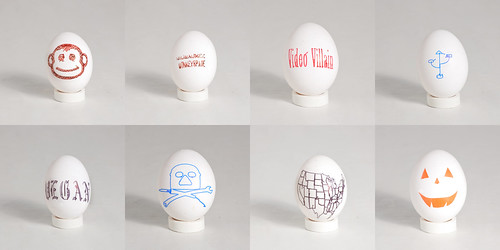
Choose your hat, sir!
PVC Pipe Egg Stand
In my last blog post I mentioned using a piece of PVC pipe for an egg stand. Well, I did eventually do that, and it worked well.
It was as simple as a few minutes with the coping saw and the Dremel, and I had a nice little white stand to put finished eggs on to take photos of.
This looks much better than the poorly constructed cardboard tube stand you may have seen in the original pirate egg photo.
(Now the next challenge will be finding the optimal way to photograph white eggs on a white background.)
Egg-Bot + PVC Pipe
In looking around the workshop for something to make an egg stand out of (for better photos) I came across some scrap PVC pipe from when I constructed a backdrop stand, and realized that the pipe was round, and white, and might actually work in the Egg-Bot… you know, instead of an egg.
I did a quick test, and it ended up working. The first plot depended on a lot of curves, and since I didn’t bother to spend much time doing a proper set-up (you know, finding the center, adjusting the headstock, tailstock, and distal arm) it wasn’t spectacular, but it did work.
Since the pipe is not a sphere, I did make some adjustments to the SVG file, making sure it wasn’t too tall so the pen wouldn’t angle itself too much. After drawing on the first pipe I ended up wrapping a piece of paper around the second one so I could keep testing without running out of pipes. I also ended up sticking corks into the end of the PVC instead of using cardboard shims. This probably helped a bit with the centering.
I’d like to try to get some thicker PVC, closer to the width of an egg, and keep experimenting with this… it’s a nice way of testing without running through a dozen eggs in an evening.
I wanted to do a bit of research on the cost of being a member of a hackerspace or makerspace (and by cost I mean, monthly membership fees.)
I started at hackerspaces.org and just looked at spaces in the United States.
Since the information is coming from a wiki, we can’t be sure it’s completely accurate, but I think it’s a good gauge of fees nonetheless.
| Name | Location | Members | Per Month |
|---|---|---|---|
| ATX Hackerspace | Austin, Texas | 41 | 25 to $75 |
| Ace Monster Toys | Emeryville, California | 80 | $80 |
| Alpha One Labs | New York, New York | 37 | $40 |
| Arch Reactor | Saint Louis, Missouri | 23 | $10 to $30 |
| The Baltimore Node | Baltimore, Maryland | 18 | $50 |
| Bitsmasher | Santa Cruz, California | 33 | $50 to $100 |
| BrainSilo | Portland, Oregon | 20 | $40 |
| Bucketworks | Milwaukee, Wisconsin | 50 | $75 |
| Collexion | Lexington, Kentucky | 25 | $5 to $60 |
| Columbus Idea Foundry | Columbus, Ohio | 50 | $25 |
| Cowtown Computer Congress | Kansas City, Missouri | 30 | $30 |
| Crash Space | Los Angeles, California | 30 | $37 to $108 |
| DHMN | Appleton, Wisconsin | 23 | ~ |
| Dallas Makerspace | Dallas, Texas | 50 | $50 |
| Dayton Diode | Dayton, Ohio | 8 | $50 |
| HacDC | Washington D.C. | 42 | $50 |
| HackPittsburgh | Pittsburgh, Pennsylvania | 25 | $30 |
| HackerDojo | Mountain View, California | 183 | $100 |
| Hackerspace Charlotte | Charlotte, North Carolina | 30 | $40 |
| HeatSync Labs | Chandler, Arizona | 17 | $50 to $75 |
| Hive 76 | Philadelphia, Pennsylvania | 15 | $15 to $100 |
| I3 Detroit | Detroit, Michigan | 32 | $39 to $89 |
| Jigsaw Renaissance | Seattle, Washington | 50 | $15 to $200 |
| Midsouth Makers | Memphis, Tennessee | 20 | $25 to $75 |
| Milwaukee Makerspace | Milwaukee, Wisconsin | 17 | $80 |
| NYC Resistor | New York, New York | 27 | $75 to $115 |
| New Work City | New York, New York | 75 | $300 |
| Noisebridge | San Francisco, California | 80 | $40 to $80 |
| Pumping Station: One | Chicago, Illinois | 50 | $30 to $50 |
| Sector67 | Madison, Wisconsin | 21 | $50 to $100 |
| Twin Cities Maker | Minneapolis, Minnesota | 35 | $50 |
| Zero1 Nation | Colorado Springs, Colorado | 14 | $13.37 to $35 |
I tried to include some of the spaces I was already familiar with, or ones in larger cities, which I thought would provide some good contrast.
I also included the number of members in thinking that the number of people involved would affect the cost per member per month.
Some of these are non-profit organizations, while others are not. Some have student or “starving hacker” rates, and most of them seem to have open times/events where anyone can come. Some allow guests (and some suggest guests make a small donation to the space) and many have tiered membership levels.
I talked to Bre at NYC Resistor and asked about their pricing, which says that if you teach classes your membership fee is $75 per month, and if you don’t teach classes, it’s $115. I had assumed this was to reward people who teach by giving them a discounted rate, but he suggested it was more along the lines of punishing those who are slackers and don’t do any teaching. Either way, it’s a neat idea. :)
Obviously the amenities or “what you get” for your membership will vary. Some of the spaces are meant for you to have a permanent desk, provide good Internet pipes, meeting rooms, and function as your everyday office, while other are more like workshops, with tools you may not have access to anywhere else. Prices obviously vary depending on geography as well. Of course you’d expect that In a bigger city you’d probably find more members, and that the rent would be much higher. In a place like Appleton, Wisconsin, it may prove hard to get enough people interested to build momentum to secure a space. (It took the Milwaukee Makerspace folks about a year to get their space.)
If I’ve got anything wrong, or your space was mentioned incorrectly above, please let me know… This was really just a quick look at the monthly membership fees of a bunch of different spaces.
Disclaimer: I am involved with Bucketworks, and I am friends with the folks in DHMN and Milwaukee Makerspace, and have a loose affiliation with Sector67, Jigsaw Renaissance, and Pumping Station: One. (The last three being members of the Space Federation.)