Categories
Uncategorized

Blinking Ambulance Paper Craft

I’ve been cranking out projects for Brown Dog Gadgets recently. Mostly paper craft things (that light up using conductive Maker Tape) or LEGO based things that use Crazy Circuits. Some projects area really quick and easy, and pretty fun.

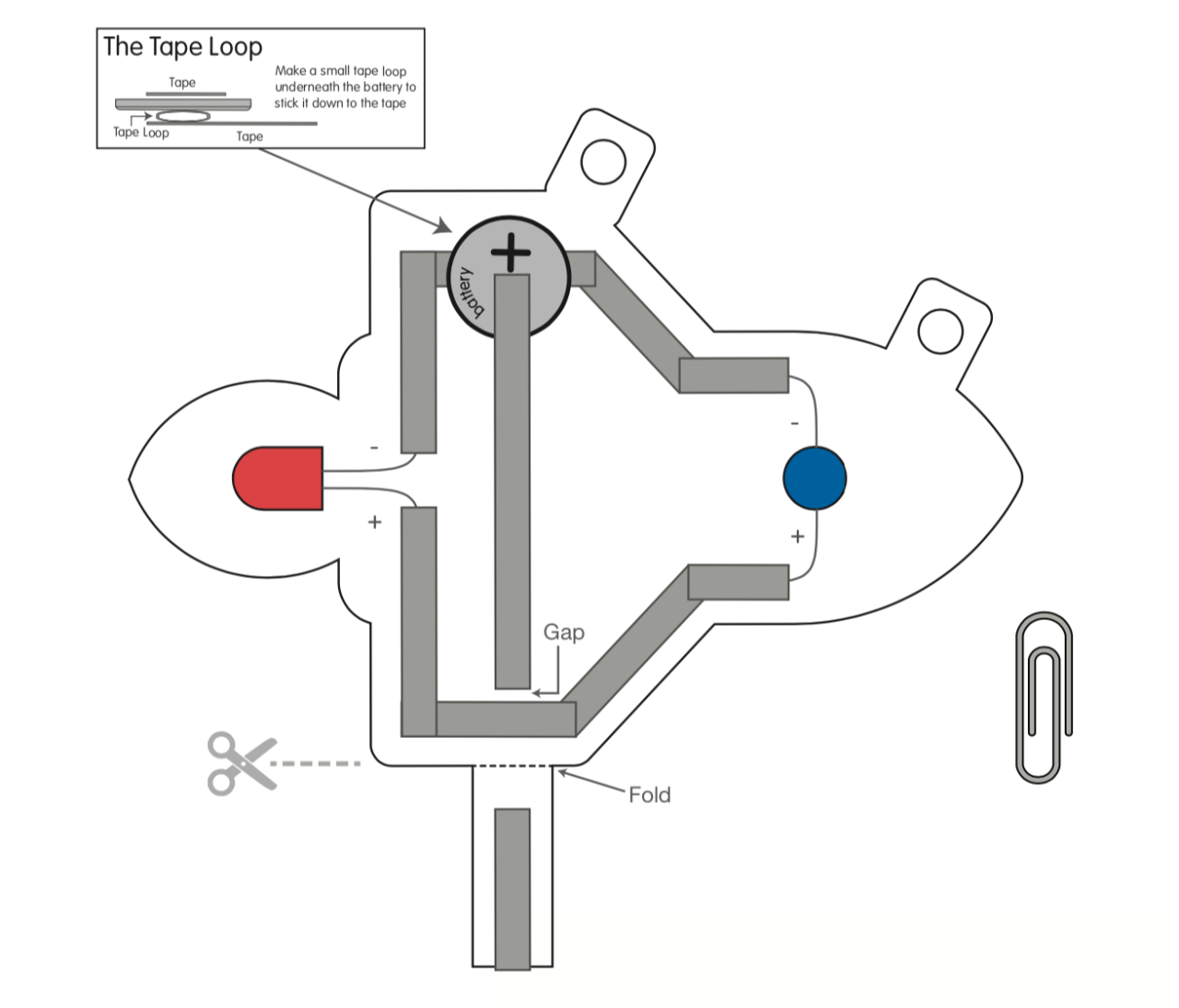
Here’s an ambulance that uses two 10mm LEDs with the Crazy Circuits Blink/Fade Board to alternately blink on and off. (Josh calls this “Ambulance Mode”).

The original ambulance I started with can be found on SVGRepo. It was published with a CC0 license, so I was able to modify it and use it, which is awesome. We provide all sorts of templates and files for people to download and print on the Brown Dog Gadgets Dozuki site.

You can grab the Blinking Ambulance and follow the guide to make your own. If you don’t want to source your own components, the Brown Dog Gadgets Shop has everything you need.

Categories
Uncategorized

Arduino Class Files

I finally got around to publishing the files for the Beginner Arduino Class I used to teach.

Here’s some text from the README:

In 2016 I taught a classed titled Electronics & Sculpture in the Peck School of the Arts at the University of Wisconsin Milwaukee. I often referred to the class as “Arduino for Artists”.

Basically, it was teaching art students, some of whom never programmed or wrote any code, how to activate their art using the Arduino platform.

We had five concepts we wanted to cover:

  1. Digital Input
  2. Digital Output
  3. Analog Input
  4. Analog Output (PWM)
  5. Serial Communications

In 2017 I moved on to teaching the class at Milwaukee Makerspace and I refined the curriculum a bit to resemble very closely what you’ll see in these files. I used components I had available. (Note: I should add a parts list at some point).

In 2018 I started teaching the class at Brinn Labs, usually with the help of Becky Yoshikane (friend, former coworker, former student, and former classmate). We taught the class all through 2018 and a few times in 2019.

I no longer teach the Beginner Arduino Class, but I wanted to share the files in case anyone else could find them useful.

Each lesson contains an Arduino sketch and a wiring diagram (as a Fritzing file, and a PNG file). In some cases there are also images showing components, and most of the sketches should have links to the concepts/functions used in the sketch.

So there you go. If you find any of this useful, let me know. I wish I was in a position to keep teaching the class, as I really enjoyed doing so, but it’s not something I can do right now, but maybe you can. Let’s keep trying to teach electronics and prototyping to people and see what happens!

Categories
Uncategorized

Sharks, Cats, and Lasers!

Okay, not really lasers… just LEDs in straws that look like lasers. I’ve been working on some paper circuit projects for Brown Dog Gadgets and after we talked about the Darth Vader card and other “laser” cards I mentioned Shark with Lasers and Laser Cats… so we had to make them. (Find these and more in the Paper Circuits section of the BDG site.)

These cards use drinking straws with LEDs and a bit of hot glue to give the laser effect. Check out this Shark with a Frickin’ Laser Beam

Maybe you prefer cats to sharks? We’ve got that covered… Here’s a Laser Cat! (Not to be confused with Laser Cats, the short film.)

The diagram on each card shows the circuit, which is activated by a switch mechanism on the other side of the card (not shown.) More downloadable paper craft circuit projects can be found on the BDG Dozuki site. I’ll highlight some of the fun work we do every now and then.

Categories
Uncategorized

SD Card Rescue Mission

SD Card Rescue Operation

I got a frantic message from my daughter Saturday morning. Seems she was shooting photos all day on Friday and when inserting the SD card from her camera into her computer (and another computer, and then her camera again) it would not mount. She did note that it was a little “damaged” on the corner…

The photo above shows some of the carnage that ensued. She brought the card to me, and I told her I’ve read that you can cut the card in half, remove the “chip” and insert it into a new card. I first cut in half a micro SD card adapter (since I have a lot of them) but that was no good. It’s internal design didn’t match up. No loss. Then I tried the card that came with my 3D printer, since it was only 4GB, and that did not work… I eventually told her that she might have to purchase an exact match so the chip would fit right…

She headed out to the store, found one, brought it to me, and five minutes later, Bob was your uncle. Meaning… it worked! I did warn her to just copy all files off it, and not to rely on it for the future. (She also bought a new SD card to replace it.) So now I had two of the “chips” from SD cards with no cases…

SD Card Rescue Operation

What else to do but 3D print replacements! I found a few models, and chose this Replacement SD Card Case to print. It printed pretty quickly, since it’s small and flat.

SD Card Rescue Operation

I ended up using a bit of super glue to hold the chip in place, and then adding electrical tape to it to shim it a bit so it would fit right into the SD card slot…

SD Card Rescue Operation

It sort of works… in some SD readers, but not all. That said, I’d recommend this fix for rescue, but I’m not sure I’d call the card reliable for everyday use. For instance, I’d prefer to not have it fail physically in my laptop, but in an external card reader I could tear apart if needed, I’ll use it. It seems to work fine in my Nikon camera, but not in my 3D printer, so… hit and miss.

SD Card Rescue Operation

If you go this route it might work, it might not… maybe there’s a better 3D model to use, I don’t know, and I super glued mine in place, which means I’ll wait until the next SD card failure.

Categories
Uncategorized

Tracking Outages

Back in 2004 I found that my ISP had outages where we would not have an Internet connection for a while. That was… a lifetime ago. Well, 16 years ago, anyway. You can see the mention of it in my Connection Report post. I guess I started with checking every 30 minutes, but I eventually changed that to every 15 minutes. As you can see above, I eventually changed it to every 5 minutes because in the last 6 months I’ve seen that we sometimes have very short outages…

And then I thought, why the heck am I looking at connections when I really want to look at “no connections”, so I rewrote the Perl script that’s been running via cron for 16 years to check for no connection instead.

So now I check every minute for an outage, and if there is one, we log it. Now, I know there are more efficient ways to do this, and there’s probably a better way to run this, and there’s probably an open source monitoring solution that will do 100 times what this little script does, but… I don’t care.

Sometimes I care more about hacking together a solution for myself, and messing around with it every now and then, and actually, you know… writing code for the sake of writing code.