The Clapper from Pete Prodoehl on Vimeo.
Instead of getting the proper amount of sleep, I made this video. I hope you enjoy it.
 RasterWeb!
The Clapper from Pete Prodoehl on Vimeo.
Instead of getting the proper amount of sleep, I made this video. I hope you enjoy it.
There’s plenty of articles about the crop factor on digital cameras. If you shoot with a DSLR you’re probably familiar with a full frame sensor versus a cropped sensor. Here’s one titled Crop Sensor (APS-C) Cameras and Lens Confusion, and if that’s not technical enough for you, check out the Wikipedia articles Image sensor format and Crop factor.
Done reading? Good. Does your head hurt? That’s not good! Let’s look at some pictures instead. (Note that the same lens, a Nikon 28-70mm f/2.8 set to 28mm was used for all of the following shots. It’s an FX lens, not a “cropped” DX lens.)

Fig. 1: Nikon D300

Fig. 2: Nikon D3x
If you’re familiar with the Nikon world, the D300 is a cropped sensor camera, also knows as a DX format camera. (Or APS-C in some circles.) While the D3x is a full frame sensor. Simplified, the D3x sensor is bigger than the D300 sensor.
You’ll notice the photo from the D3x shows a whole lot more. Same lens, same focal length, but different size sensor. The larger sensor of the D3x gives us a wider angle of view.
That all makes sense, right? So let’s look at the RED ONE.

Fig. 3: RED ONE at 2K Resolution

Fig. 4: RED ONE at 3K Resolution

Fig. 5: RED ONE at 4K Resolution
Whew, look at that… You’ve got a much wider field of view when you shoot at higher resolution. The difference here is that with the Nikon D300 and D3x, we’re using two completely different cameras with two different sized sensors, but with the RED ONE, it’s still the same camera, we’re just changing the effective size of the sensor by changing the resolution. Shooting at 4K uses the whole sensor, while shooting at 3K uses only a portion, and 2K uses an even smaller portion.
So when using the RED ONE, the resolution you shoot at is going to affect the amount of sensor used, as well as the angle that your lens will capture. Important things to remember when you need that wide shot.
If you’re on location with the RED, it’s a good idea to have a Digital Imaging Technician Station (or DIT Station) which will allow you to backup up all the footage you are shooting while you are in the field, and will also allow you to view the footage and make sure it’s all good before you leave the field.
If you’ve got an unlimited budget, I’d recommend the top of the line MacBook Pro (which can easily run $3,000-$4,000+ depending on how you deck it out) as well as a few external drives. Look at the G-Technology offerings, as they have various solutions depending on your budget and needs. The G-Raid mini is a nice, small, bus-powered drive with a quad interface (FW400, FW800, USB2, eSata.) Get a few of these. You could go with the 1TB, but the 500GB might be fine. You want your data in two places, and not “RAID two places” but “two different physical drives” places. The RED Drive holds 320GB, so if you are dumping a full RED Drive, you could just dump it to a 500GB drive (well, two drives) and mark it as “DONE” and move on. Oh, and since we have gobs of money, pick up an ExpressCard with eSata on it to put in your new MacBook Pro.

For the “dumping” of data, you can either use something like R3D Data Manager which does all sorts of checksums for the data, can backup to multiple locations at once, and has other nice features, or you can do a standard Finder copy. R3D Data Manager is $79, which is not too bad… again, what is your footage worth? If you want to fly in the Finder, and can review everything you dump, that can work too.
Speaking of software, RED has provided a number of excellent tools for free. Grab REDCINE-X, RED ALERT! and whatever else you may need at RED’s support site. REDCINE-X is a nice little app for checking the footage you just shot.
So where’s the “Low Cost” part come in? Well, let’s say you don’t have the budget for the top of the line MacBook Pro… that’s fine, get the bottom of the line MacBook Pro (at least get a Pro, you want Firewire 800!) and with that get some drives. I still really like the G-Raid minis, but you could probably find USB bus-powered drives that are cheaper (and slower!) if needed, but again, we do want as much speed as we can afford. (Bus-powered drives are nice because you never know where power will be when on location… if there is power at all.)
If you are shooting to CF Cards, do yourself a favor and get a Sandisk Extreme FireWire Reader (about $65) which will dramatically speed up transferring of footage compared to a cheap USB Card Reader. (The low end MacBook Pro has just one Firewire port, but you can plug the Firewire CF Card Reader into the the back of the G-Raid mini, which has two ports.

So we’ve go the MacBook Pro, which is $1,300 before adding AppleCare (but here’s a tip, you can get a refurb, plus AppleCare for it, for about $1,295) add in two G-Raid minis (the 500GB) at about $450, and a CF Card Reader for $65. We come in under $2,000 for this set up, which is not the ULTIMATE portable RED DIT Station, but it’s a Low Cost one, that is effective enough to get the job done.
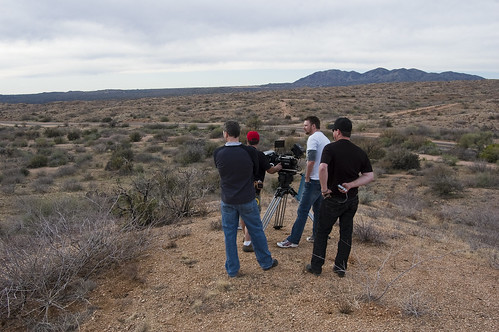
Work can be hectic, work can be stressful, but work can also be fun.
I got the chance to fly out to Arizona for a shoot last week. When we left Milwaukee (at 5AM) it was 0° and a few hours later we were in Arizona where it was about 65°. A nice change of pace from the harsh Wisconsin winters. We also went out to the desert for some shooting while we were there. Sure, it got cold at night (in the 40’s) but we survived.
The first day I think we wrapped just before 1AM, and since we’d gotten up around 4AM to get to the airport, well, it was a loooong day. The second day was a bit more laid back, but we still hustled and got everything shot.
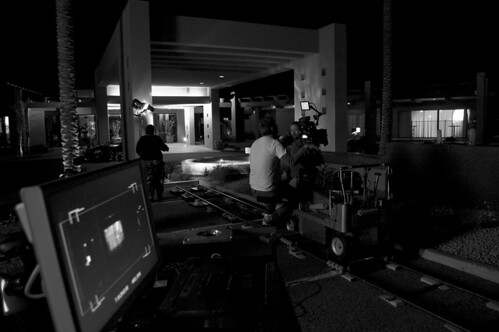
This was our first out-of-state shoot with the Red One and our biggest worry was traveling with it. Scott Bourne’s blog post Traveling? Better Get a UPS Account had me a little worried, and we decided that checking in our baby was not a good idea, and shipping it all was not a good option due to the tight schedule of the project, so what we ended up doing was buying a ticket for the Red One. Yup, it ended up being a passenger, with it’s own ticket, and it’s own seat. (Sadly, it didn’t get it’s own carry-on or snack.)
We had two other crucial pieces of gear, and since we had 3 people flying out there, two of us just took the gear as carry-ons. This let us know where the gear was at all times, and as I said more than once “equipment is more important than clothes!” meaning, we could buy new clothes, but lenses, filters, matte box, etc. would be near impossible to replace if it was lost along the way.
Making sure the Red One could go on the plane took quite a bit of legwork and phone calls. Between the TSA and the airline, we got conflicting information, but eventually we were armed with printouts from the TSA web site and reassurance that what we wanted to do would work… and it did.
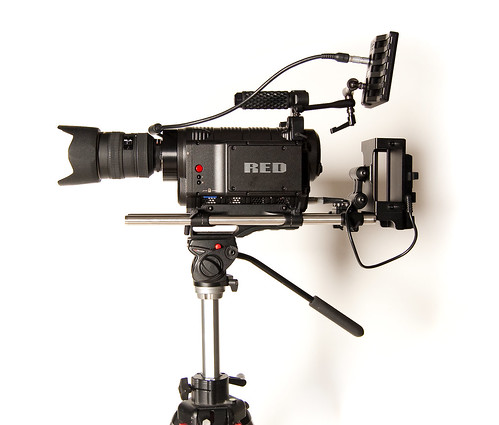
Yeah, it’s pretty amazing…
The Red One (seen here with the Nikon 28-70mm f/2.8 lens mounted on it) is a digital cinema camera. It just can’t be considered a “video camera” by any means.
It’s interesting how much of what you know from photography and film seems to come into play when using it, as opposed to what you know about video, and your old fashioned video cameras.
Not that I’m much of an expert yet, as I’ve spent just a very short amount of time working with the Red One.
But I do have to agree with anyone who has used the word “amazing” to describe it.
Red One. Amazing.