


Three Laws

I’ve been thinking a bit about the role of police in society lately, and with good reason. Of course, I’m also a sci-fi nerd, and I love robots, so I thought about the Three Laws of Robotics.
- A robot may not injure a human being or, through inaction, allow a human being to come to harm.
- A robot must obey the orders given it by human beings, except where such orders would conflict with the First Law.
- A robot must protect its own existence as long as such protection does not conflict with the First or Second Law.
And I wondered, if police truly are public servants, could we establish a set of laws that they should follow?
- A police officer may not injure a human being or, through inaction, allow a human being to come to harm.
- A police officer should respect all human life, and do what they can to serve humans, except where such action would conflict with the First Law.
- A police officer must protect its own existence as long as such protection does not conflict with the First or Second Law.
It’s a bit simplistic, and in theory, there are already laws/rules that police officers should follow.
Of course when a robot breaks the rules they can be reprogrammed or dismantled. We do not as of yet have a similar punishment for human police officers.
Baltimore Node

It’s been a while (two years) since I’ve been to Baltimore, and since I got to visit Baltimore Hackerspace last time, I really wanted to visit Baltimore Node, which I originally tried to visit in 2011! This time I succeeded.
Maze was kind enough to show up and give us a quick tour. He said that they have about 35 members now, and oddly enough Michael D. who was one of the original members of Milwaukee Makerspace is/was a member. I was hoping he could give me a tour but oddly enough he was back in Milwaukee when I was in Baltimore. Missed Maker Connection!

In the front room is our old pal Han Solo… in carbonite! We’ve discussed making one of these at Milwaukee Makerspace but it hasn’t happened yet. Supposedly this one was made from a mold that was made for the film, but wasn’t the one that was used in the actual film. It still looks good, though! There’s also some fine furniture, a box fan, and an old-timey lamp on the wall.
OK, I’m just gonna get this out of the way. Baltimore Node has a blue box. It’s not a TARDIS. It’s a bathroom, which they affectionately call the “Baff-Frume”.

I didn’t get a photo of the inside, but it’s pretty much a toilet and a roll and not much else, surrounded by thin plywood walls. I mean, it works, and luckily, it’s small so it should be easy to clean!

And hey, how many spaces can claim then have a rocket almost as large as their bathroom? (It appears there is also a ventilation fan. Good call!)

The side of the “Baff-Frume” features a wonderful poster showing all of the best ways to get electrocuted or otherwise killed in Germany. Dr. Prodoehl points out her favorite.

As we all know, everything is more terrifying in German. Especially operating a forklift. Unheimlich!
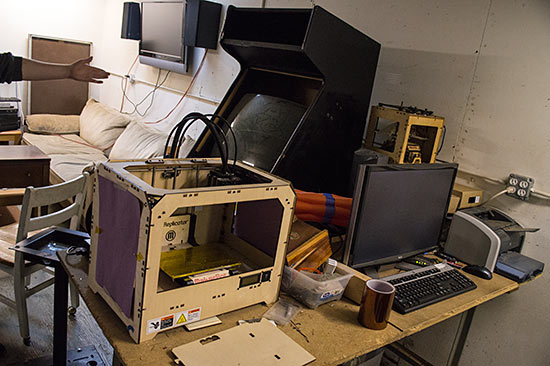
3D printing, with a MakerBot Replicator (1st gen) and an old MakerBot Thing-O-Matic. There’s also an inkjet printer, but I think it just prints ink on paper in two dimensions. There’s also a video game cabinet in the back. We started talking about MAME cabinets, so I can’t remember if this was a MAME cabinet or a specific game.

Electronics area, soldering irons, components, oscilloscopes and all that jazz…

There was a big big LED thingy that was moved to the new space probably didn’t get installed and up and running yet. I asked Maze how many LEDs there were and he said “A lot!”

The shop area is in the back. The space was previously used by the current landlord who does wood working on another floor of the building. Having a maker as a landlord is probably an ideal situation.

Plenty of tools for making, and it’s even fairly organized… Screwdrivers, wrenches, hammers. Come on down to Cunningham’s Hardware!

Here’s the big-ass Chinese laser cutter. Also, someone likes trains, or is planning to maker a laser-cut train, or something. Say it with me “Motion card SoftDog no same!”

The craft area, where at least two people can get crafty at the same time. Maze said every now and then someone comes in and wants to do some sort of crafty thing.
(I always appreciate that spaces will have some small collection of things for a specific making discipline. I think it was i3Detroit that also had a really small craft area. The effort is worth recognizing.)

I’m going to call this one “One Thread to Rule Them All” or maybe “The Last Thread” or something. It’s not even conductive thread! :)
Thanks again to Maze for the quick tour. I love seeing other spaces and checking out the equipment and projects, and just seeing how they are laid out and function.
Sadly, I did not get to Hive76 in Philadelphia during this trip, which was my second (failed) attempt. I’m hoping to visit other spaces this year if possible. I keep a list of spaces I’ve visited here.
Rapidly Replicating

When you need a part for your 3D Printer, you just print a new one, unless the part you need breaks, preventing you from printing the part you need… or something like that.
I ended up making a replacement part from a piece of wood. Yeah, wood. I used a saw and a drill to make it. Ridiculous, but true!

It actually took me two attempts to make one from wood, but damn, it worked! I got the printer up and running again, did some prints that turned out fine, and then printed a replacement part.
The funny thing is, I’m pretty sure I printed a replacement part months ago, but I think it failed, or I lost it, or something else.

I took the opportunity to slightly improve and strengthen the replacement part in the hopes it will last a bit longer. I uploaded it to Printables.com so I can easily find it when needed.
| inches | mm | |
|---|---|---|
| 1/16 | 0.0625 | 1.5875 |
| 1/10 | 0.1 | 2.54 |
| 1/8 | 0.125 | 3.175 |
| 3/16 | 0.1875 | 4.7625 |
| 1/4 | 0.25 | 6.35 |
| 5/16 | 0.3125 | 7.9375 |
| 3/8 | 0.375 | 9.525 |
| 7/16 | 0.4375 | 11.1125 |
| 1/2 | 0.5 | 12.7 |
| 9/16 | 0.5625 | 14.2875 |
| 5/8 | 0.625 | 15.875 |
| 11/16 | 0.6875 | 17.4625 |
| 3/4 | 0.75 | 19.05 |
| 13/16 | 0.8125 | 20.6375 |
| 7/8 | 0.875 | 22.225 |
| 15/16 | 0.9375 | 23.8125 |
| ~ | 1.0 | 24.5 |
Handy chart for conversion between stupid Imperial units (fractions and decimals) and smart Metric units.
See Also: Mixing Imperial and Metric and Screw/Bolt Diameters
Get to this quickly using p2url.com/inmm