Categories
Uncategorized

Radio Milwaukee Radio

Radio Milwaukee Radio

I started working on this project months and months ago, so I should probably share what I’ve got so far… as always, it’s a work in progress.

If you live in Milwaukee and listen to the radio, you’re probably familiar with 88.9 Radio Milwaukee. I’m certainly familiar with it, as it’s a great station, and not just for the music, but for their pieces that spotlight the great things happening in Milwaukee.

Since I don’t actually live in Milwaukee right now, it’s a little difficult to pick up the broadcast at home, but no worries, since they stream it over the Internet, we can use a Raspberry Pi (a cheap single-board computer) to play the stream.

Radio Milwaukee Radio

All we need to do is add some power and some speakers (and a little bit of code) and the Radio Milwaukee Radio is ready to go!

I used this post to figure out how to run a script at system startup. Since the Raspberry Pi runs Linux, I’m comfortable mucking around on the command line via SSH, others might not be, but since the worst thing you can do is destroy the entire system and have to re-load it onto an SD card, the risks are small.

Oh, and here’s the script.

#!/bin/bash

mpc clear
mpc add http://radiomilwaukee.streamguys.net:80/
mpc play

MPD is the Music Player Daemon, which deals with playing the stream, and MPC is the Music Player Client which controls the MPD server. The script tells mpc to clear whatever it’s doing (just in case) and then add the 88.9 stream, and start playing it.

(It’s a bit more complex that just that, as there are some startup services that need to be added, but I still need to clean up that code.)

I’ve seen a lot of complex Raspberry Pi radio streaming projects, and while I’ve also played around with different clients to control things remotely via a browser running on a phone or tablet, I wanted to keep this really simple, and create a single-purpose device that did one thing… play the awesome stuff I hear on Radio Milwaukee.

(I also put together a short video showing it in action.)

Note: I also wrote up a post about laser etching the logo on the Milwaukee Makerspace site.

Categories
Uncategorized

Printable Guns on WNYC

WNYC 3D Printed Guns

A few weeks ago I was interviewed by a reporter from WNYC for their New Tech City show about 3D printed guns.

I know a lot more about 3D printing than I do about guns, but since the two have intersected, the media is looking for people with knowledge in both subjects, and I guess I know enough about both to talk intelligently about it. :)

We are not yet at the stage in home 3D printers where you can just download and print a working gun. It may be 10, or 20, or 50 years out, but don’t worry about it, because the one thing I’ve heard numerous times in talking to various members of Milwaukee Makerspace is this bit from Have Blue:

The one point I try to make (and that they generally fail to grasp) is that if it eventually becomes possible to download a file from a website, feed it to a printer, and have a fully operable handgun a few hours later, the technology will have already impacted our lives in far more incredible ways.

Just think about that… We’re already making progress on printing human organs. Imaging printing a medical device that could save someone’s life, or medication, or your next mobile phone, or food, or any specialty tool you need. It’s potentially World Changing, so to focus on guns alone is just silly.

You can check out the episode on their site: 3D-Printed Guns and Violent Video Games, or listen using the embedded player below.

Categories
Uncategorized

MaKey MaKey Apple Piano

A few months ago a bunch of us from Milwaukee Makerspace took part in Bay View Gallery Night, and jason set up the “Fruit Synthesizer” which was a Makey Makey with a variety of fruit, and some software combo of Max MSP and GarageBand. People really enjoyed it, and with the most recent Art Jamboree happening with jason out of town, I figured I would pick up the slack.

Makey Makey Apple Piano

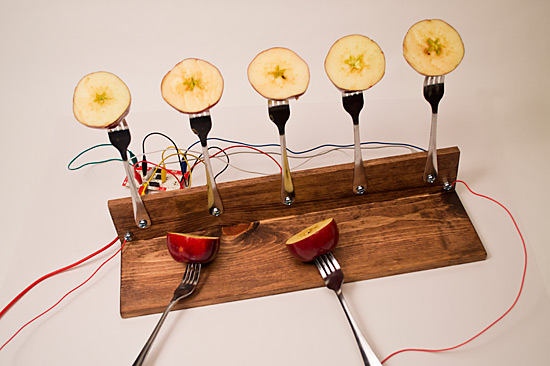
With a simple base made with two pieces of wood, some dollar store forks, a few nuts, bolts, and bits of wire, we had the Makey Makey Apple Piano.

One of the issues with jason’s Fruit Synthesizer was that you had to touch the fruit. He did provide hand sanitizer, but with it being flu season, having dozens of people touch a piece of fruit seemed like a bad idea, and forks just seemed like the right thing to keep hands clean, and work like xylophone mallets.

Makey Makey Apple Piano

For a project like this it’s nice to have the controller board visible, so people can see it and you can easily explain how it works. The Makey Makey was sitting right behind the forky board thing.

Makey Makey Apple Piano

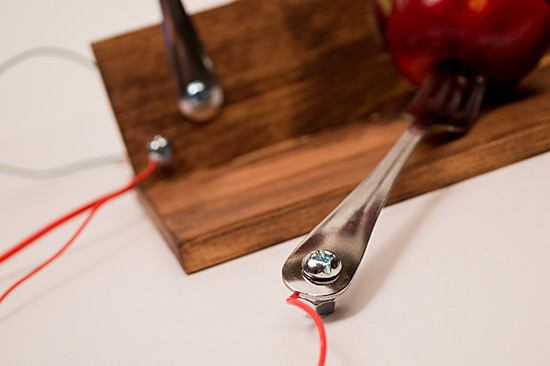
The bolts that hold the forks in place also doubled as terminal connectors that I could attach the alligator clips to.

Makey Makey Apple Piano

I added bolts at each end of the base for the ground connections. (And used red wires to match the Makey Makey, and the apples.)

Makey Makey Apple Piano

The wires running to the forks serve two purposes: they ground the forks to complete the connection that the Makey Makey needs, and they also tether the forks to the base to keep it all together. (Drilling holes through the forks was a lot of fun. I had to assure my wife I did not drill holes in our everyday dining forks.)

Makey Makey Apple Piano

But wait! You can’t just have a bunch of forks and apples and wires and expect something to happen… you also need a computer and some sort of software to do anything useful…

MakeyPlayer

I wrote a Processing application to play sounds and light up the specific apple you were hitting. (I got a good start on the code from this sketch.) I had a lot of fun(!?) with the Minim library. My original plan was to export the Processing application as a Windows executable and use an old netbook to run it. That sort of worked, but I don’t know if the Windows XP machine was up to the task, because when I set it up at the event (after extensive testing in the lab) the audio freaked out, so I ended up switching to my MacBook. An Apple Computer controlled by Apples… fitting, right?

(Processing isn’t the greatest thing for this sort of task, and MIDI really is the right way to go, but we’re already planning our next Makey Makey Monstrosity, so expect some improvements.)

So did it work? It worked! People had a good time playing with it. Here’s a few photos…

Makey Players

Makey Players

Makey Players

Makey Players

Makey Players

Pro-tip for using apples: Keep some lemon juice on-hand! I gave the apples a squirt every now and then to keep them moist and prevent browning. Over the course of 4 hours I did have to change out the apples that were used as the mallets after they got a little mushy. Some people were really pounding on them!

Update: Here’s a short video of the first test of it.

Categories
Uncategorized

Natty Bohacks

As you may have read, I recently visited the Baltimore Hackerspace, and they have a high-tech/old-timey logo that looks like this:

Baltimore Hackerspace

And Dr. Prodoehl (my lovely wife, who spent many years in Baltimore) pointed out it was the “Natty Boh” guy. So who (or what) is Natty Boh?

Natty Boh is National Bohemian, a beer that originated in Baltimore back in 1885. The Natty Boh dude can be seen around Baltimore in the employ of many local organizations, and you can still get National Bohemian beer (though it’s owned by Pabst now) and if you just want some sweet Natty Boh gear, nattybohgear.com can handle that.

(And yeah, the Natty Boh dude does look like the Pringles dude… they’re probably related.)

There’s also some great Natty Boh commercials you should check out, and there’s some sportsball history as well. Heck, even those Tumblr kids like Natty Boh!

Anyway, if you’re in the area, I’d recommend a visit to Baltimore Hackerspace for all your making and hacking needs.

Categories
Uncategorized

Aaron Swartz

When I read about the death of Aaron I cried. I’ve been on this planet, a planet which often confuses me, for over 40 years. I’ve known other people who have died, and sometimes I cried, but more often than not, I didn’t, unless they were a close relative or very close friend. Aaron was not a close friend in the typical sense, but he was someone I admired. I probably first encountered Aaron around 2002/2003 or so… he would have been working on RSS stuff while I was working on RSS stuff. I filed some bug reports for some software he was writing called rss2email,. My “bug reports” consisted of letting him know about typos in the documentation. He was probably half my age at the time, but more than twice as good at programming. He shot me a few emails that said “Thanks!” and that about sums up our correspondence.

Through the years I read his weblog and it was fascinating. You could tell how damn smart he was. And I’m not going to say “smart for his age” because I try really hard not to discriminate based on age. Aaron was intelligent, but lacked certain experience, due to his age, and his personality, but he was someone to admire.

I wrote a blog post about Aaron back in 2006 titled Aaron’s Money. It summed up a few things about him. I also seem to remember a post where he said he was working on a laptop and someone told him he needed a huge monitor, and his reply was something along the lines of “I’m only looking at a few lines of code at any one point in time… why do I need a bigger monitor?” I’m still not sure he’s the one who said that, but I think it sounds like something he’d say. Ideas and freedom seemed to be much more important than money or physical things to him. He was someone who believed that the ends justify means. (Sometimes they do.)

When I think about the things he could have accomplished in his life, had it not been cut so short, it depresses me a bit, and being depressed is a bad thing, so I don’t want to be depressed. To avoid being depressed I try to do things I think might make the world a better place… even if it’s just a small part of the world I inhabit.