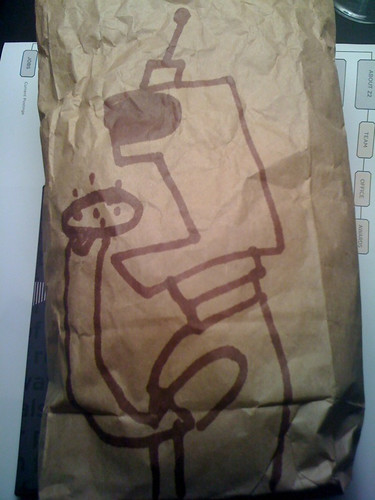
Today’s Lunch Bag Art is a robot that eats cookies. Why would a robot ever eat cookies? Well, cookies are delicious delicacies. (Or at least they used to be.)
 RasterWeb!
Today’s Lunch Bag Art is a robot that eats cookies. Why would a robot ever eat cookies? Well, cookies are delicious delicacies. (Or at least they used to be.)
 Web608 is Madison’s Web Community, and was inspired by Web414, which is Milwaukee’s Web Community. Abraham Williams was one of the founders of Web608, but moved away from Madison, so Andrew Shell led this session on rebooting the group and deciding how to run things in the future.
Here is the audio from the session. It took place in the big room at BarCampMadison, where it was very echoey and the AC noise was loud. Still, I cleaned it up a bit and it should be listenable.
You can also download an MP3 file if you’d like. (And for our freedom loving friends, enjoy an Ogg file.)
Also, if you want to get all of the audio automagically downloaded podcasting style, subscribe to the feed. I’ll add in more BarCamp stuff as I get it all edited and published.
I’m a signer-upper. I admit it. I have a problem. Most of my friends are too. (Well, my nerdy online friends, but then, that’s most of my friends.)

“Hey look, Froblunet launched today!?”
“What is it?”
“I don’t know, but I should probably sign up, create a profile, and check it out!”
And so it goes…
Scattered across the web are pieces of me… Accounts I’ve signed up for, wanting to check out some new site, just to see how they do it. How do they handle importing friends? How do they do uploads? How? How? How? It’s a question web people tend to ask. We’re either convinced there’s something interesting to see, or something to learn, so we sign up, give it a try, and maybe use it. Or maybe not. I should probably sign up… this might be the next big thing!
And then sites get to brag that they have 1 million users. Or that in their first day they had 100,000 people sign up. (75,000 of which never return.) But the media likes those numbers, and the news sites, and blogs, and investors like those numbers. They make everyone feel good. Except me.
Here’s an idea… Now that I’ve signed up for Froblunet, which is the hottest new thing since yesterday, I’d be totally fine with them emailing me months later if I never log in again and saying:
Hey, we noticed you haven’t logged in for 3 months, are you still interested in using Froblunet? If not, would you prefer to:
1. Delete your account (We’ll delete your data, and your email, and never bother you again.)
or
2. Inactivate your account (You can reactivate any time… we’ll reserve your username, and keep your email on file in case you ever want to try it out again, but we won’t email you again.)
I’d probably pick option 2 in many cases. Yes, inactivate my account! (Maybe it’s just my fear of deleting accounts. Please tell me I’m not the only one.)
But it’ll never happen.
I mean, I’d like to see this happen… but I think it’s unlikely. Sure, some engineer at Froblunet might think it makes sense, and would probably prefer to know that the people using the system are actually using the system. More accurate numbers are things engineers tend to like. Capacity planning and all that. But the sales and marketing guys would never go for it. Why say “We have 200,000 (active) users” when they can say “We have 500,000 users!”
By the way, I’m launching this new site next week that I’d love to have you sign up for…
 The year was 1988. I heard Verbal Assault’s album Trial, and I fell in love.
I spent the entire summer enjoying that album. And then fall, and winter, and the next year.
Verbal Assault also came to Milwaukee, and played at the Odd Rock Cafe to a small crowd. A very small crowd. I think it was a Saturday afternoon… the weekend Summerfest opened. It was great seeing them, but the live experience doesn’t have an affect on me the same way Trial does… even today.
For years I didn’t hear Trial… I had it on vinyl and it wasn’t available on CD, and my respect for artists prevented me from trying to find some illegal download of it. For years I checked verbalassault.com hoping to see Trial get released in some digital form, but it never happened. Finally, I gave up, and digitized my old worn out copy of 12″ musical magic. Hisses, pops, and cracks galore…
And it’s amazing. The sound quality is not great… I’ve got a worn-out needle on an old turntable with my battered vinyl. It’s also the greatest thing I’ve ever heard.
Maybe it transports me to an idealized time in my life: young and mostly care-free, but I tend to not buy into that salad days bullshit and in thinking about it, it’s the powerful words and music that still affect me.
Listening to it more than 20 years later, I start to wonder if it’s had a major effect on my life, or if it’s some strange coincidence that I find so much of it relevant to whom I’ve become.
So many of their songs have to do with persevering, and not giving up, and continuing when the odds are against you. Never stop. In all my years, I’ve always found it hard to quit things I believe in. It’s a rare thing for me to do. I don’t like to admit defeat. There’s plenty of things I probably should have quit over the years, but didn’t for one reason or another. I find a way to rationalize things. (I guess It’s a good thing I tend to do creative things, and not self-destructive things.)
So right now, I’m listening to Trial by Verbal Assault. And when I’m done with that I’ll probably listen to it again. That may continue for a while.
Here’s what someone else has to say about Trial.

Inspiration can come from the past. Something that inspired you more than 20 years ago can return to inspire you all over again. Music + Words. Those two things combined can be the most powerful thing in your life. And I’m thankful for that.
See Also Verbal Assault (Affected Me!)
