Categories
Uncategorized

Casting Wax Balls

mold-05

I made wax balls, and it worked, and I did it using 3D printed molds. I won’t get into why I want/need wax balls in this post, but I swear it has nothing to do with candle making or bath bombs. (These balls are about 12mm in diameter.)

model-02

I originally modeled one ball with one sprue, and then used the loop function of OpenSCAD to make a series of them in a row, slightly overlapping the sprues.

model-01

My original plan was to make silicone molds (like I did with this wax stick) and went as far as creating a positive and a mold box, but along the way I thought about just using a 3D printed mold…

mold-01

Here’s the 3D printed mold created using PLA filament. The holes are for bolting the two pieces together using 3mm hardware. (I used tape in the earlier versions, but it did not work well.)

mold-02

I didn’t need to fill all the bolt holes, but wanted a few options so I could get tight clamping. Wax doesn’t have the same low viscosity of something like water, but when melted is a bit runny, so I just want to make sure I can keep it from leaking out too much.

mold-03

Once the mold is assembled it’s just a matter of melting some wax and pouring it into the mold. I’ve had a few balls with air pockets when demolding, so I’ve taken to sticking a thin piece of wire in to stir around the wax in an attempt to remove the air. (I do have a vacuum pump which I’ve considered trying to use, but the chamber is currently too small to fit much in it.)

mold-04

Hey, wax balls! Originally I tried spraying the mold with mold release, but I don’t think it helped much. What does help is putting the cooled molds into the freezer for a bit (this is a known trick for getting wax candles out of glass jars.) It helps solidify the wax enough to make it come out fairly easily. I do break a few every now and then but a lot less than before I used the freezer method.

The other great thing about using 3D printed molds is that I can very easily (and cheaply) make a whole bunch of molds, which is good, because I may need a few thousand wax balls…

Categories
Uncategorized

RepRap Z Motor Mounts

bracket

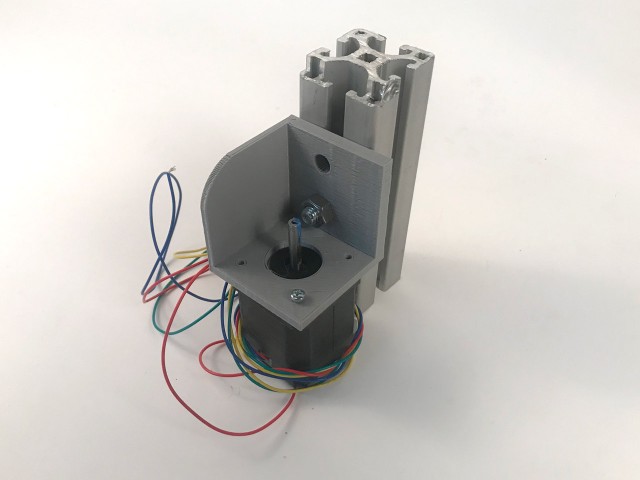
As the RepRap build continues, I designed some motor mounts that will work with the 40mm extrusion I’m using. The Nema 17 stepper motors I’m using are about 43mm wide, so they hang just outside the extrusion if centered, so I’ve designed the mount to be slightly off-center so the motor do not hang outside the frame.

mount-rails

I’ve incorporated the model into the overall render of the printer. I don’t have the hole yet for the smooth rod to fit into the mount. I’m looking at models like this one to base my work on.

reprap-6000

I’ve also worked on the full model a bit, and made it slightly larger for reasons I’ll get into in a future post. I’m currently thinking of a few ways to make this machine a bit more flexible in its capabilities, and a larger frame made sense for that. (And it means I can waste less extrusion when I cut it down to size.)

motor

Things look wonky in this photo because that’s actually a piece of 38mm (?) extrusion I had handy, since all the 40mm is at Milwaukee Makerspace right now. I’ve got a few projects to wrap up before we cut down and mill the extrusion, so I’ll probably keep working on the printed parts for a bit.

Categories
Uncategorized

RepRap 6000

reprap-prusa-i2

I built my first RepRap back in 2012, and it worked for a few years, and things broke, and I usually fixed them, but when I got my Maker Select Plus I sort of pushed the old RepRap off into a corner. I eventually loaned it to someone at Milwaukee Makerspace, who promptly broke it, and then I repaired it (again) and got it working, a bit…

To be honest, the machine is quite a mess, but I’ve decided to stop being sentimental about it. It’s existed for a while now as a “This is how we used to build printers!” example, but I decided that the time has come to take drastic measures, and it’s all coming apart.

Over the years I’ve managed to scrounge up some nice components for a new build. Some 450mm lead screws from an unnamed medical facility, some 12mm x 720mm smooth rods from an old laminator, etc. Couple that with the donor parts from the old RepRap and I’ve got most of what I need to build a new machine.

RepRap v07

The one thing I don’t have is extrusion for the frame, but Mark (of SoM and UMMD fame) does. He’s got a pile of 40mm Aluminum extrusion which I might acquire to start on this new RepRap journey. (If I do not acquire it, I may end up going with 20mm extrusion. Not ideal, but possibly more affordable.)

I won’t go to the lengths that Mark has in building his heavy-duty industrial-style printers, but I’m headed in that direction just a bit. I’ve looked at the Wilson TS, other T-slot designs, and any other printer using Aluminum extrusion, and I’ve got a rough design figured out. I may try to use machined parts rather than printed parts where I can (meaning where it’s practical and affordable.)

I’ll probably stick with a 200mm x 200mm heated bed for now (since I’ve got two of them) but since I have the long lead screws already, I’ll be shooting for a 200mm x 200mm x 400mm build volume. Quite a bit more Z than the 180mm of my Maker Select Plus.

While I want this to be an economical build, mostly by using components I already have, I’m not trying to build a super-cheap 3D printer. I considered buying a second printer, but the pile of parts and a mostly functional donor machine convinced me to go the route of designing and building my own. Plus, this means I’ll have a printer to experiment on while still having another that actually works! (In theory, anyway.)

Categories
Uncategorized

Little Articulating Arms

little-hands-01

I’ve been prototyping a little helping hands thing using some 3D printed parts and miscellaneous hardware, mostly #8-32 nuts and bolts, and a few springs.

little-arm-model

The 3D part is pretty simple, a cube with two holes. It’s based on my Camera Accessory Mounting System (CAMS).

little-hands-00

First version… still figuring out how to connect everything…

little-hands-02

Springs for tension were added, but I might try using small wingnuts to adjust tension as well…

little-hands-03

Tiny zip ties hold the alligator clips in place. They can still rotate freely and are somewhat tight…

little-hands-04

Hard to see in this one, but I stacked two blocks on top of each other to allow rotation in both directions. I’ll keep working on this to see where it goes.

Categories
Uncategorized

Press Knobs

press-knob-model

You may remember that I recently printed a press. While the press works quite well, the one thing I didn’t like about it was the fact that I needed a screwdriver to adjust the tension. That was a quick fix though. You see, I am not a newbie when it comes to knobs.

I had one other issue when assembling my press. While it calls for M5 bolts, I only had M3 and M6 on hand, so I did what any Imperialist would do, and used non-Metric hardware. A #6-32 bolt is smaller than a 5mm bolt, but it’ll do.

You can see above the quick model I made in OpenSCAD. The idea was to build a knob in two parts around the head of the bolt. A nut tight against it would keep it from spinning loose. (We just need to finger tighten it anyway, not torque it down hard.)

press-knob-01

Here is out bolt, nut, and two printed parts ready for assembly.

press-knob-02

We put the bolt through the hole in the bottom. It needs to be screwed in as it’s meant to fit tight to give it a little more “bite” into the plastic.

press-knob-03

There! Screwed in all the way. (Not pictured: the power screwdriver I used to drive it in all the way.)

press-knob-04

Now we put the nut on. You can spin this all the way to the end so it’s up against the plastic.

press-knob-05

Once the nut is at the end I hold it with some pliers and gently tighten the screw by hand. (Not pictured: screwdriver I used to tighten the bolt.)

press-knob-06

Now we snap the top part in place and that’s about it. I was pleased that both the Prusa i3 MK3 at work and my Monoprice Maker Select at home did a great job of printing these parts and they fit together perfectly.

press-knob-07

That’s it! Tiny knob is assembled. That was pretty easy, and it works quite well. I am pleased.

press-knob-08

In my mind, the beauty of a 3D printer (like any tool) is that it can help you solve problems. This may not be world changing, but the fact that I can solve a problem by making a computer drawing of an object and then telling a machine to “print out” that object is still some sort of magic. But as the saying goes “Any sufficiently advanced technology is indistinguishable from magic.” So, yeah…