Categories
Uncategorized

The Button

The Button

NOTE: Need a button? Now you can buy one! Visit raster.etsy.com.

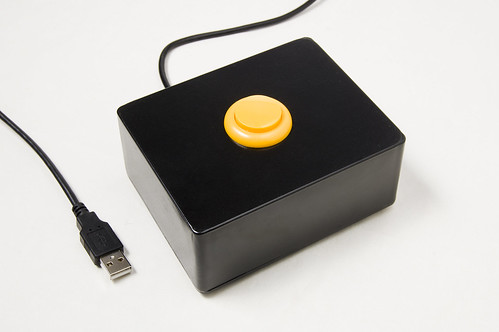
I was in need of a button, but not just any button. A USB-enabled button that could emulate a single key being pressed on a keyboard. This is that button…

It consists of the following materials:

The Button

I used a Teensy as it’s a very simple (and cheap!) way to emulate a USB HID. I do wish the Teensy had mounting holes. I ended up not mounting it at all and letting it just hang loose, which should be fine, as it’s so lightweight. There’s a bit of electrical tape wrapped around the Teensy and the solder joints.

For the box, I wanted something metal, so it would be heavier and more sturdy than the typical plastic project box. Matt Gauger of Milwaukee Makerspace suggested I check out Mammoth Electronics, as they make boxes for guitar pedals. I ended up choosing their “tall” enclosure.

For the button, I really like this button over the one I ended up using, but it was too tall to fit in the project box. Unless you’re a “button snob” you probably won’t notice much difference between the two.

If you’ve got USB cables lying around, use one… otherwise, you can get one from Monoprice for less than a dollar. I pretty much buy all my cables from Monoprice.

As for the rubber feet, I picked some up at the local hardware store… as well as some black spray paint. (Note: If you are ordering the button from Sparkfun, just get the rubber feet from them too!)

The Button

There was one more item I needed. The button needs a 27.3 mm hole to fit into, which means I needed a hole that was 1.07480315 inches wide. Well, 1.07480315 inches is pretty close to 1.0 inches, so I ended up getting an Ace Bi-Metal Variable Pitch Hole Saw. (The link is not the exact one that I got. I ended up getting mine at the local Ace Hardware store.)

As for the process, the Teensy part took a small amount of time, (see the AWESOME Button) and the drilling was a little tricky, as the 1.0 inch hole was just slightly too small. A bit of creative drilling with a regular drill bit fixed that though. The spray painting was the real time consuming part of it all. As for the assembly, I originally envisioned mounting the Teensy on the bottom plate of the box, and having a hole where the USB connector would be accessible, but I ended up going with what you see in the photo. (I just used the Dremel to cut a small groove for the cable to fit into.)

And why do I need a yellow button that can emulate a key being pressed? Well, sometimes you just need a yellow button that can emulate a key being pressed…

The Button

Note: A number of people have asked for the code I used, and even though it is in the comments, I thought I should post it in here as well.

/*
 * Button.pde
 */

void setup() {
  Serial.begin(9600);
  pinMode(10, INPUT_PULLUP);
  delay(500);
}

void loop() {
  if (digitalRead(10) == HIGH) {
    delay(10);
  } else {
    Keyboard.print(" "); // we print a space
    delay(1000);
  }
  delay(10);
}
Categories
Audio Channel Uncategorized

The Maker Movement (Audio)

Web414 Matt Gauger and I talked about the The Maker Movement at the February 2011 Web414 Meeting. Here’s the audio in case you missed it.

Besides the history of the maker movement, and the modern-day rise of it, we talked about Hackerspaces and Makerspaces, how they may be similar or different, as well as some of the things that go on at a makerspace, and what type of people (and things) you might find at one. We also talked about our own place here in town, the Milwaukee Makerspace.

We really didn’t do a lot of planning for this talk, as we were filling in for someone with another topic who couldn’t make it, but I think that’s fine, and just goes to show that you really don’t need to prepare that much to speak at Web414, as long as you know the subject, and can speak intelligently about it (or fake it like we did) you’re good to go.

You can find the audio at Ourmedia or the Internet Archive, and you can download an MP3 of this talk.

Also, if you want to get all of the audio I publish automagically downloaded podcasting style, subscribe to the feed.

Categories
Uncategorized

Time Lapse Bot 3

Time Lapse Bot 3

I built the original “Time Lapse Bot” in September 2009 before BarCampMilwaukee4 happened. I managed to get an old office chair that someone was throwing away and thought I could put it to good use to move around the iMac and camera rig I had attached to it. You can see the original Time Lapse Bot post for more info.

The main issue with the original Time Lapse Bot was that if you unplugged it, you had to boot it up again, set the clock, and then restart the image capture. We thought about a UPS to give it a bit of “unplugged” time, but never added one.

Next up was Time Lapse Bot 2 which used an old clamshell iBook in place of the old iMac. This made everything much lighter but because the battery couldn’t hold a charge we still suffered the inability to unplug it and move it while it was running. (We typically solved this problem with really long extension cords.)

Time Lapse Bot 3

Time Lapse Bot 3 is the next step in Time Lapse Bot technology. We’ve taken an old PowerBook G4 (donated by Matt Gauger) which has a good battery in it, and paired it with a Canon ZR800 MiniDV camera, which also has a good battery. The result is a unit that can run on battery (at least for a few hours) and starts charging the batteries as soon as you plug in the AC power cord.

The entire unit is housed in a custom case which allows for easy transport. By “custom case” we’re referring to the plywood box that I constructed and painted black. That’s what we consider the pinnacle of “custom cases” around here.

The software that runs Time Lapse Bot is EvoCam by Evological. It’s $30 and well worth it. It’s feature packed, and rock solid. If you’re putting together a Mac-based time lapse rig that uses a video camera, or a web cam, or whatever, I highly recommend it.

Here’s a few of the time lapse videos we’ve made with the help of Time Lapse Bot.

We’ve finally reached a point where we are fairly pleased with Time Lapse Bot and it’s performance, so this is obviously not the time to sit still and relax. We’re currently working on a few upgrades to Time Lapse Bot, and hope 2011 brings even more Time Lapse Bot goodness to all the folks who enjoy time lapse videos…

(Thanks for reading this. If you’re reading it on Facebook or Google Reader or somewhere else it got syndicated to, consider visiting the original post, especially if you’d like to leave a comment.)

Categories
Uncategorized

PHP Hacking

The Milwaukee PHP User Group invited me to speak at their January 2011 meeting, so I talked about PHP Hacking, or at least my perspective on it, with a talk titled: PHP Hacking: The battle between great ideas and not-so-great code.

I recorded the audio from the talk, and since I felt the slides themselves didn’t say much, I thought about syncing the audio to the slides and making a video, but since SlideShare has these things called SlideCasts, I thought I’d give that a try…

John Boutelle has a great intro called Slidecasting 101 which explains it all. I found the SlideCast tool pretty easy to use, my only complaint would be that I’d like to not publish my slides until the audio is synced. If there’s a way to do that, I must have missed it.

As for the talk itself, it pokes a lot of fun at Java, .NET, Ruby (on Rails) and a few other things… Don’t take it too seriously… much of this talk was for entertainment purposes. Also, I mentioned a few people in this talk, or if I didn’t mention them, I mentioned things that they’ve done. Here’s a few: Dave Winer, Rogers Cadenhead, Kellan Elliott-McCrea, Phil Wilson, Vinny Carpenter, Steve Minutillo, Matt Gauger, Tom Henrich, and probably a few more I’ve forgotten…

If you’d like me to come speak at your user group or meeting, let me know… I’d be happy to come and insult whatever technology you’d like, even your own. :)

This presentation is published under a Creative Commons Attribution-ShareAlike license. You can also see it at SlideShare.

Categories
Audio Channel Uncategorized

Plan a BarCamp

BarCampMadison While waiting around for BarCampMadison3 to start, Matt Gauger and I started talking about how to plan a BarCamp. Luckily, the recorder was rolling to capture this incredibly insightful conversation.

And when I say “incredibly insightful conversation” what I really mean is File Under: Silly.

Also, listen carefully for a guest appearance by Ashe Dryden.

You can also download an MP3 file if you’d like. (And for our freedom loving friends, enjoy an Ogg file.)

Also, if you want to get all of the audio automagically downloaded podcasting style, subscribe to the feed. Why you would want to do this, I’m not really sure.