Categories
Uncategorized

Laser. Cut. Wood.

Milwaukee Makerspace Medallion

Since the dawn of time, man has battled against wood… no, that’s not right. What I mean is, since we got the Laser Cutter at the Milwaukee Makerspace, I’ve wanted to cut things out of wood with that powerful beam of light.

And now I have… mostly. Sort of. Yeah.

Boxy

My first (failed) attempt was when I cut a box, and tried to use whatever scrap piece of 1/4″ plywood I had lying around the house. (For you metric folks, that’s just over 6mm thick.) Since it was typical crappy plywood with layers and glue and stuff, it made some nice burns, but couldn’t cut through it.

Milwaukee Makerspace Medallion

Well, here we are, with a nice piece of wood cut by the laser. This piece of wood is 3mm thick. (For you non-metric folks, that’s about 0.118110236 inches thick.) The Milwaukee Makerspace logo is etched into the wood, which makes this piece of laser cut wood at least 125% more awesome.

Craft Plywood

And what kind of wood is this? It’s not crappy plywood I found in the basement. I ended up going to the hobby store and buying a nice piece of wood, which you can see on the label, says it’s 1/8″x4″x12″ craft plywood. It wasn’t too expensive at $1.25, but I can’t really get larger pieces than that at the hobby store, so I’ll need to look elsewhere. (Oh, the receipt listed it as “Baltic Birch Plywood” which is what I want. (Baltic Birch is what they use for MakerBot frames. If you’ve got a recommendation on where to get it, especially local to Milwaukee, let me know!)

As my previous post mentioned, the laser cutter is just 25 watts, not super-powerful, and it may need a good cleaning, but if you’re willing to make a few passes, or a few passes plus a dozen, you should be able to cut the right type of wood, if it’s not too thick.

In my next post I’ll talk about preparing the file, as well as some tricks for multiple passes with the laser cutter.

Stay Tuned!

Categories
Uncategorized

Fixin’ It

Fixed Outlet

When the wife left the house yesterday she asked me to fix the outlet cover in the bedroom as it was loose and plugging things in was proving difficult. She said that she would have done it but was afraid of getting electrocuted.

I was about to tighten up the plate, but I noticed that the entire outlet was loose. No problem! I just removed the cover and tightened up the screws… Problem! The outlet box was too far into the wall, and my first attempt at pulling it out resulted in a nice jolt and the box not moving. (She didn’t warn me not to electrocute myself, but maybe she should have.) My guess is that whoever put the outlet in didn’t do it right, and just figured that putting things in loose and calling it a day was easier that fixing it and doing it right the first time.

Plastic Spacers

I thought about using some washers, but I would have actually had to find some washers, and they would have needed to be the right size, and I would have needed to have enough of them… and if you’ve seen my workshop, you’d know this is not an easy task.

I could have 3D printed some spacers! But like my last repair involving plastic, it would have been overkill for this task and would have taken way to much time.

So my solution involved taking some plastic anchors and snipping them to the right length. I have enough anchors that I could repair a dozen outlets in the house and still have a bunch left over. (Let’s hope I don’t have to do that, by the way.)

Categories
Uncategorized

Lasers and Boxes

Since we’ve got a laser cutter at Milwaukee Makerspace, I wanted to test out the BoxMaker and cut a box out of wood.

BoxMaker

BoxMaker is a sweet little web app that lets you put in the dimensions and spits out a PDF file with what you need. I wanted a box 3″ x 5″ by 2″ and for the material thickness, I got out the digital calipers and took a measurement. (Take note of this! The material thickness is important later on…)

BoxMaker

So here’s the PDF file I got. Depending on the size of your material (or how much you want to waste) it may make sense to move the pieces around. Since I imported the PDF file into CorewDraw (which is what the laser uses to cut things) it was fairly easy to rearrange the pieces. I also deleted the text that describes the box. I could have just made it a color the laser cutter ignores, but I figured I had the info in the original PDF file.

Wood

Now, our laser cutter is 25 watts, but since it’s old and may need some cleaning, it might not be outputting 25 watts, so when I put my thin piece of wood into the laser cutter, MattN mentioned that it wouldn’t cut it. I figured I’d give it a try, and yeah, even though I did multiple passes and tried to refocus the laser, it just couldn’t do it. I kept checking the depth of the cut, but it just wasn’t “cutting” it. (Pun intended!)

At this point I was fine with the failure to cut wood, and I knew the laser cutter could handle acrylic, so I grabbed a piece of that…

Cut Acrylic

The laser got through the acrylic just fine, as it’s done before… but wait, what did I say about the material thickness before? I said you needed to measure it! Since the acrylic was thinner than the wood, I should have generated a new file, but I didn’t. So this is what I got…

Finished Box

Here’s my box, with the tabs way too big, which gives it an interesting look I suppose. Not exactly what I was after, but at least I know that it works… mostly.

I also want to try a box with the T-joints like the MakerBot uses. Box-o-tron looks like it will work, if I can get it running. (Any other suggestions?)

Also, I had a fun time trying to photograph clear acrylic, so it wasn’t a total loss. :)

Categories
Uncategorized

The Three Buttons

The Three Buttons

Always there are three: button A, button B, and button C.

Categories
Uncategorized

The RasterWeb! Report for 2011

Two-Thousand-Eleven was a banner year for RasterWeb!. We published a total of 253 blog posts, and as you can see from the pretty chart, we were fairly consistent, with March and May being the standout months. The rise in March was due to another successful RPM Challenge which I did in February, and then released all the songs in March. May’s activity was due to me joining in for Processing Month, and posting a lot of sketches.

2011 Report

Compared to 2010, we had 35 more posts. But you don’t care about quantity, you care about quality! Were the posts better in 2011? I don’t know, that’s for you to decide. I did however, have a few really popular posts, mostly thanks to Make Magazine, who featured a number of my posts including: Arduino-Controlled CheerLight, Zen Button, DIY Panorama Rig, Make A Sketch Draws With Processing, and the super-popular DIY Photobooth Rig with Custom Button.

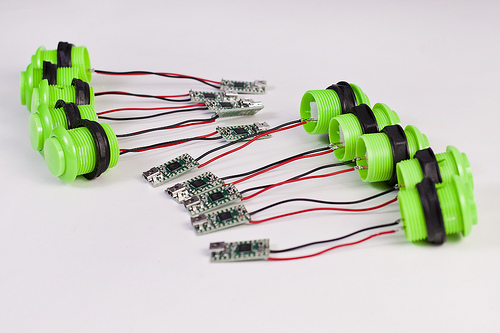
Speaking of buttons, my button posts got a lot of attention/traffic from Sparkbooth and from the Teensy Project page. In fact, the post probably has more comments than any other I’ve written. I’ve also got emails from a lot of people who bought a Teensy and then got totally lost trying to build a button. I helped as many people as I could. Which brings us to…

Why I continue this blog…

It’s safe to say that one of the main reasons I started blogging had to do with wanting to give something back, or as the kids say, to “share” things. When I started using the Internet in the mid-1990s, I learned a lot, and at some point I decided that I wanted to share my knowledge as well, so that’s what I did. I didn’t get into it for the money (there was none back then) but for the purpose of putting things out there that would help other people, the same way other people helped me. Sure, I publish a lot of, um, weird stuff that has nothing to do with helping people, but hey, they can’t all be winners.

So with my latest adventures in making, I’ve started telling people that sharing about making is just as important as making. I believe that, and I know that Make Magazine believes that, and Instructables believes that, and Adafruit believes that. It inspires others to make things, and do things, and that’s a good thing.

If I’ve inspired you, that makes me happy… and if you’ve inspired me, I thank you. Let’s keep it up!