Categories
Uncategorized

The 911 Phone

911 Phone

What looks like an ordinary desk telephone is actually part of a museum exhibit at BBCM that lets kids practice dialing 911. When they pick up the receiver they hear a dial tone, and can then dial “911” (which plays the proper DTMF tones) they then hear the line ringing, and then an operator answers and says “911, what is your emergency?”

Phone

Inside the phone I’ve replaced the guts with a Teensy 3.2 and Teensy Audio Adaptor board. This combination handles the phone receiver being lifted, the keypad being pressed, and the playing of audio.

Teensy Pins

After consulting the docs for the Teensy Audio Adaptor board I knew which pins were used for the adaptor board, and which I could use for the receiver switch and the keypad. From what I could tell 11 pins were available (0, 1, 2, 3, 4, 5, 8, 16, 17, 20, 21) and I needed seven for the keypad and one more for the receiver switch. Plenty of pins!

I chose to go with a (perhaps slightly odd) method of having some pins point up instead of down so that I could attache female jumper wires to them. I’m not 100% happy with this solution, but it worked for this.

Teensy Wiring

The female jumper wire headers are nearly as tall as the Teeny + Audio board combined. You can also see a potentiometer used for controlling the volume, and a 1/8″ audio jack which goes to the speaker in the handset.

Receiver switch

I re-used the existing receiver switch and wired it into the Teensy. The switch is NC (Normally Closed) instead of NO (Normally Open) so I just reversed the logic in the code when looking for the switch to trigger. When the receiver is lifted the dial tone sound plays. (Also, if you leave it off the hook too long, it will play the annoying off-hook tone. (I aim for realism with this stuff!)

Keypad back

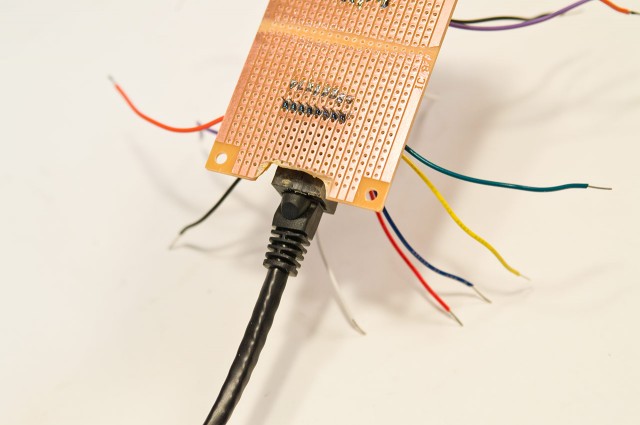
The keypad was also re-purposed (once I figured out the wiring) and wires were soldered onto the tiny thin wires, and the heat shrink tubing was added. The keypad runs to a small piece of perfboard which is used to connect to the Teensy, along with a few resistors in the mix.

Keypad Notes

Notes on how to wire up the keypad. I originally used a SparkFun Keypad for testing and development before I had a (broken) phone to tear apart.

Fritzing Diagram

Here’s a quick wiring diagram showing how it’s all put together. (I try to match wire colors in diagrams with the real-world wire colors, at least before any maintenance/repairs happen.)

Connection Board

The connector board allows for easily removing the Teensy if that’s ever required, or replacing the keypad if it goes bad. It also adds in the resistors necessary for the keypad to function properly.

Magnet Mount

For mounting the Teensy into the phone I opted to use an old hard drive magnet with a piece of wood attached. The Teensy is screwed to the wood (which is a good insulator) and the magnet is also screwed to the piece of wood, and then attaches strongly to the steel base of the phone. (There’s also gaff tape on the base of the phone, as extra protection between electricity and metal surface.)

RJ9 Wiring

I found this diagram for the speaker wiring from the handset, and wired the appropriate lines to a 1/8″ audio plug that goes into the adaptor board.

One other thing I did was add code that only accepts “properly dialed/formatted” phone numbers. So if you pick up the receiver and dial “4738911”, you didn’t dial “911”. You need to hang up and try again, with a proper “911”. There’s a buffer that looks for 3 digits (or 7 digits) and if you can’t get that right, it doesn’t work. As I said, I aim for realism with these things…

(Note: I may have left in a few numbers from testing. I’ll have to ask Jenny or Hannibal for the details.)

Categories
Uncategorized

Doing (Many) Things

doallthethings

I saw more than a few friends share this TED Talk video titled Why some of us don’t have one true calling, and I read the transcripts and (like my friends, many of whom are makers) felt this described me.

I think the question people ask as an adult isn’t “What do you want to be when you grow up?” but instead it’s “So, what do you do?” and I know you’re supposed to answer by describing your job, but many people don’t define themselves by their job. For a while I answered “Whatever it takes!” but while amusing (to me) it’s not a great answer. And then there’s those of us who have two (or three) jobs, or things we do, or organizations we’re involved with, and sometimes they are interrelated, and sometimes they are not.

There’s some people who think my main thing is photography, others think it’s 3D printing, and still others think it’s web development. While I’ve done all those things (and still do, to some degree) none of them encompass all I do.

I know people who are Graphic Designers, and also play music, or shoot photos, but that’s still (to me) a primary thing with some secondary (related) things…

All of this brings me back to a piece Les Orchard wrote back in 2006 titled Serial Enthusiast. The Serial Enthusiast will jump from interest to interest, starting new projects, excited about trying something new, and learning a new skill. They may get really into something, go really deep, do a thing, and then move on.

We often use the term “Skill Collector” at Milwaukee Makerspace, because people tend to join with one thing in mind, like 3D printing, or wood working, or whatever, and then they get into electronics, or sewing, or building weird machines, or whatever.

In related news, I’ve been asked to write a bio for one of my jobs, so I crowdsourced it, and ask my Facebook friends to write it. This is what I got:

Pete Prodoehl is an expert punk who will probably automate the grading of his student’s assignments. His addiction to hammers will probably not affect his performance, although he may place pizza bagels on robots in the name of “art” or something. While pioneering toaster-oven-based HDPE recycling, he has also been known to keep the “makey bits” with Hardware and PHK. Shock. Fro-Gurt. Granola Bars. Probably the “Best colleague ever” who also shows promise at rolling sushi. Besides making a Big Button, he also helped invent (parts) of the Internet. (He also crowdsourced this bio.)

It’s not 100% accurate, but it is amusing.

So… What do you do?

Categories
Uncategorized

Kenilworth Open Studios 2016

KOS 2016

Mark your calendars! Kenilworth Open Studios is happening Saturday, April 9th, 2016 at UWM’s Kenilworth Square East facility at 1915 East Kenilworth Place in Milwaukee.

Besides being able to check out some of the awesome work done by students and faculty, you can see the Digital Craft Research Lab and you can check out what I call the “Physical Computing Lab”, which is also known as “KSE 516” or “Room 516 on the 5th floor” which is where I teach Electronics and Sculpture.

I’m hoping some of my students can share projects during the event, and I might even have some things to show. If you’re at all interested in physical computing stuff (Arduino, Raspberry Pi, things that move and light up and make noise) visit 516 and I’ll tell you what I know.

(Are your friends going? Maybe you should go with them, or ask them to go with you! Check out the event on Facebook!)

Categories
Uncategorized

Decagon Light

decagon

One of the projects I’m working on for Maker Faire Milwaukee is something I call the “DecaLight” which will (hopefully) consists of a decagon-shaped structure with ten light bulbs that are controlled by a set of relays and can turn on and off in pre-programmed sequences. For those unfamiliar with the Decagon, it’s a 10-sided polygon (sometimes called a “10-gon”) and this specific model is a 9-simplex.

Design

Etched Wood

While I started with building a quick and dirty prototype I also decided to build a scale mode. I used the laser cutter at Brown Dog Gadgets to etch and cut a piece of 3mm Baltic Birch plywood.

LED bulb

While the full-sized version will use light bulbs, the scale model will use 10mm LEDs. I just drilled holes for the LED leads since I never got around to adding holes to the laser cutting file.

Painted

Sometimes printmaking techniques come in useful when not making prints. I spray painted the wood and after it dried I rolled on some black ink to make a pure black and white version. For the full size version I’ll be using a CNC router to cut grooves (pockets) and then paint those white while the top surface will be black.

Wood

Here’s the bigger prototype I worked on, which just has a piece of plywood with lamp sockets attached. I got the sockets for cheap from ebay, but they’re terrible.

Sockets

I later spotted some nice ceramic (rather than plastic) lamp sockets at Menards that were just a bit more than the crappy plastic ones, so I’ll probably switch to those.

Hopefully I can get the prototype working in the next week or so. I’ve still got plenty of time to complete the full-scale version, but even with 174 days until Maker Faire Milwaukee, that time will go fast!

A video posted by Pete Prodoehl (@raster) on

Categories
Uncategorized

Body and Machine (and Clicking!)

Make it Move

I’m pleased to announce that for the second year I’ve had a piece selected for Body and Machine 2016: Kinetic and Interactive Art. This year my piece Click Whir Squee will be on display. (The show runs from April 2nd, 2016 to Aoril 23rd, 2016 at the Northrup King Building 3rd Floor Gallery in Minneapolis, Minnesota.)

Click Whir Squee

Since Click Whir Squee involves abusing a piece of hardware that is close to 20 years old, I can’t guarantee it will keep doing what it’s supposed to be doing for the entire run of the show. That’s part of the excitement of kinetic art… and it’s actually integral to the statement this piece makes.

Tape!

I may try to dig up a few more of these TR-1 Minicartridges to swap in when the one in the machine gets destroyed. That might be enough to keep it running, but would rely on someone involved with the show doing maintenance. (Which I’m fine with.)

Cat!

If you’ve already seen the video, you can just enjoy the photo of a cat that has been provided above. (It is called Body and Machine, after all.) Otherwise, here’s a video.

Make it Move