
You probably remember The Sonic Titan, which had its debut at Bay View Gallery Night. The details concerning the construction of The Sonic Titan were shrouded in mystery, just a hazy cloud of unknowns, but no more! Here is the story of The Making of The Sonic Titan!
The concept for The Sonic Titan was kicking around in my head for a long time. When Neil Gershenfeld talks about making, there’s this idea of personalization, and producing products for a market of one person. The Sonic Titan may have a market of one person, myself, and I’m fine with that.

The physical manifestation of The Sonic Titan started with this speaker cabinet I saw in the alley on my way home one night. One of my neighbors was throwing it away. I always like to build upon the detritus and waste of society, so I grabbed it.

As an electronics nerd, I loved the giant capacitor bank circuit thingies on the back. I considered using them, but it didn’t fit the aesthetics of the piece.

I grabbed a screwdriver, hammer, and pry bar and got to work tearing the speaker cabinet apart.

Mmmmmm, delicious fiberglass insulation! People really knew how to DIY speaker cabinets in the olden days!

Why not add some roofing shingles to your speaker cabinet? Glue then down with some weird industrial adhesive to keep them in place, because acoustical properties.

I got the speaker out in one piece. I didn’t end up using this speaker, but I’ve still got it on the scrap pile for a future project.

A fully formed cabinet emerges! I must have forgotten to take photos of the construction process. Basically after I broke apart the cabinet I rebuilt it into the size and shape I wanted with the help of the table saw, drill, and a bunch of screws. (Oh, and there was a fun adventure with the jig saw for the speaker holes.) I also grabbed some old scrap wood my brother dropped off at my garage about two years ago. The wood had all sorts of weird slots cut into it. (Thanks, Brother!)
Anyway, the above photos shows how everything is lovingly stuffed into the cabinet. There was no careful thought or long consideration about putting things in there. It was basically “jam it in and make it fit” the whole way. Mostly.

Spade terminals come in handy for this sort of thing, and I had some handy, so I used them. The speakers came from Milwaukee Makerspace, which is always full of all sorts of weird old junk. The large fender washers are actually the scrap pieces from when I drill out Aluminum boxes to make USB controllers. Reuse!
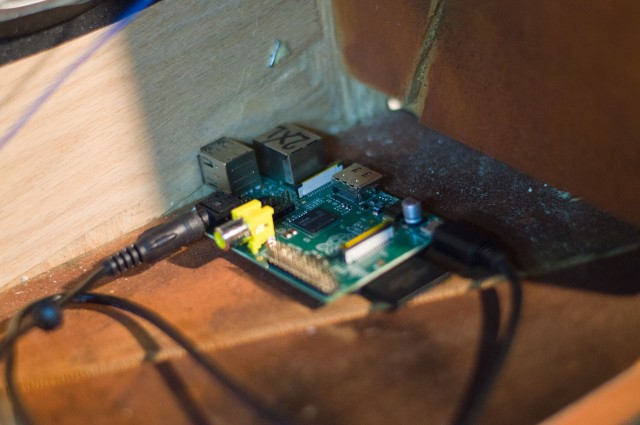
Hey look, it’s a Raspberry Pi! Yes the “Doom Box” is Linux-powered, which seems appropriate for so many reasons. But seriously, folks… I love Linux. It allows me to do things like this quickly, easily, and at a low cost. Open source is a wonderful thing.
The Raspberry Pi is secured in place by… gravity? Yeah, it’s just sitting there. It’s got a Micro USB cable for power, and a 1/8″ cable for audio out.

There’s a 12 volt power supply, this provides power to the audio amp, and to the Raspberry Pi. Wait, the Raspberry Pi needs 5 volts, not 12 volts… what!?

Oh look, there’s a buck converter which takes the 12 volts and knocks it down to 5 volts. These are handy when you don’t want to have two power supplies. Just split the 12 volt power and run to the converter and you get your 5 volts. Sweet!

There’s a few of these screw terminal blocks. This one feeds the 5 volts from the converter to the Micro USB cable that had one end cut off. Just use the red and black wires from the USB cable for power… no signal wires needed!

Here’s the audio amp. It’s got spade connectors all over. Two for the 12 volt power, and 4 for the two speakers. I’m pretty sure I screwed this down to the board. Oh yeah, I did, we’ll get to that later…

It’s a Pyle cheapie audio amplifier. Nothing fancy or super-loud, but I had it in the shop so I used it. The cover was removed because I had an idea to mount it right up to the front and use the integrated volume potentiometer and add my own wooden knob. That worked until I broke things…

…so there’s a potentiometer that got added in to replace the one I broke. And it’s not a dual pot, just a single, and probably not the right resistance. When things break and you’ve got a deadline you grab whatever you’ve got available and get things done. (At least I do, or I try to.) Wires are delicately soldered because deadline.

Some of the greebles were put into place to cover the gaps that were created when the cabinet was built because I didn’t have quite enough wood to do it right. I call the greebles a “feature”.

This little greeble works well to stuff the extra cables into. See, “features”!

And this greeble closes up the gap at the bottom… (Note: hard drive magnets are great for keeping random screws in one place!)

And over here there’s a lovely gap for the power cord to exit. Mind the gap! Use the gap! Love the gap!
Is it mere coincidence the photo above and the Dopesmoker art below share a similar color palette? Probably… or… maybe not!?!?

Check out that stoner caravan! I hope they are enjoying their journey! They should have a Doom Box to listen to!

I used Bauhaus 93 as the typeface that came close to matching the Sleep logo I liked, and made a few pieces of vinyl which were put on the wood so I could use them as stencils and spray paint on the name and labels. I like vinyl and stencils and paint. They work well together!
Wait, wasn’t there something about Linux? Of course there was! After I had the Raspberry Pi up and running with Raspbian I added mpg123 for playing the audio:
sudo apt-get install mpg123
I then wrote a long and complex script to start the audio playing and keep it playing forever by using a loop. Here’s the long and complex script:
#!/bin/bash
mpg123 --loop -1 /home/pi/Dopesmoker.mp3
I saved that script and then set it to run after bootup by adding a call to it in the /etc/rc.local file, right before the exit line.
/bin/bash /boot/playaudio.sh
exit 0
And that’s how I built The Sonic Titan. I hope you enjoyed the journey.


