
Well, I made it one more year… Take that, Silenus!
Cake courtesy of OpenClipArt.
 RasterWeb!

Well, it certainly has been a busy couple of weeks!
If you remember what was going on a month ago, I was selected to build a robot for the Flying Car Milwaukee event which took place on June 7th, 2013.
I actually finished the robot on time, presented it at the event, and won first place, which consisted of the lovely trophy you see pictured above, and $1,000. Sweet!
I’ll have a full write-up of the robot and the event soon, but just wanted to drop this post as a “whew!” mark to indicate, yeah, it all happened.
Oh, my friend Dena Nord also won first place in the design competition with her poster that featured an augmented reality component. Congrats, Dena!
In the last few weeks I also spoke at WordCamp, finished a series of paintings (post to come), took a FCPX class, filmed a TV commercial, and went to work nearly every day.
And oh yeah, I packed everything I own and moved! (Hence the boxes surrounding the trophy on the new mantle. We still need to finish unpacking.)

I’m back!

I (briefly) mentioned the Silhouette Cameo
I treat the Silhouette Cameo like a CNC machine, and have a similar workflow to the one I use with the laser cutters at Milwaukee Makerspace. I know the Silhouette folks have the Silhouette Online Store where you can buy ready-made shapes to cut, but we’re makers, and we make our own things, so I use Inkscape and if I need a shape I hit up OpenClipArt and find what I need. (Note: All the art on OpenClipArt.org is in the Public Domain, which means you can copy, modify, distribute and perform the work, even for commercial purposes, all without asking permission, because permission has already been granted.)
My daughter wanted a kangaroo cut out of vinyl to give to her friend, so I found a kangaroo on OpenClipArt and cut it for her.

The files on OpenClipArt are in SVG format, which are perfect for Inkscape, as they are the native file format, meaning you can open them right up with no conversion necessary. Here’s our kangaroo in Inkscape. (I won’t go too deep into vector artwork, but if you don’t know, you can scale up and down vector art with no loss of quality, as it’s comprised of lines defined by fancy math, and not a set grid of pixels like raster art, or a digital photo.)

The final piece was to be about 4 inches wide, or roughly 100 mm. (You can work in Imperial or Metric measurements in Silhouette Studio—and Inkscape—so use whatever you’re comfortable with.)
I resized the document to 4″ x 3″ using the Document Properties dialog box…

You can see our kangaroo will need to be shrunk to fit within the confines of the document…

Resizing something proportionally in Inkscape is pretty simple. Use the arrow tool, hold down the control key, and move one of the corner points. There’s actually more than one way to resize things, but for eyeballing it, this will work.

OK, once we have our artwork the proper size, we can save it (still in SVG format) and the we’ll need to save it as a DXF file so we can get it into Silhouette Studio.
Select ‘Save a Copy…” from the file menu…

Select “Desktop Cutting Plotter” from the file type menu. (You’ll see it has ‘dxf’ in the name as well, and you may have other DXF options depending on your Inkscape installation, but this one works for me.)

You shouldn’t need to check either checkbox, just leave the options as they are.
I should note that when exporting DXF files for other purposes, such as loading into OpenSCAD for 3D modeling, we would have needed to convert all the curves to straight lines before creating our DXF file, but the Silhouette Studio software will work just fine without this step.

OK! We now create a new file in Silhouette Studio, and you can just drag and drop your DXF file onto the canvas. Once it’s there you can resize it as desired. (Wait, didn’t we size it in Inkscape already? Yes we did, that was just my way of teaching you one more thing about Inkscape. You’re welcome!)
Once you’ve got your artwork sized and positioned, you can do your cutting with the appropriate settings.

Here’s our final version of a white kangaroo, which my daughter gave to her friend. Hooray for CNC machines that can cut vinyl!
(You may be saying, “Hey! That kangaroo looks larger than the 4″ x 3” one you mentioned above! And yes, it is. After cutting one, a much larger version was requested, so that’s the one you see here.)
This is the method I use for creating 1280×720 (aka, 720p) time lapse video files from a GoPro camera using MPEG Streamclip.

I use the time lapse setting on the GoPro, which creates images that are 2592 pixels wide by 1944 pixels high, though we care less about the pixel width and height, and more about the aspect ratio, which is all wrong for a proper video. (In fact, you can use this method for any still images you wish to finish as a video file.)
I start by compiling all the stills into a video file, and I use QuickTime Player 7 for that. There are other tools, but that’s what I’m currently using, and no the most recent version of QuickTime Player is hobbled crap that won’t work. (Hey Apple, how about fixing that?)
OK, we have our video file, but it’s practically square! Terrible! So let’s fix that…

To choose the best crop I usually do a screen grab of the image area, and then open that in Photoshop (or whatever) and size it to 1280 wide. The height should be about 960 (depending on how accurate your screen shot is.) Time for Math! 960 – 720 = 240, so we need to crop 240 pixels from the height. You can easily just skip this step and plug 120 into the top and bottom crop, but this step will let you easily make some other decision, like 140 and 100. As long as your top and bottom crop add up to 240, you’re good.

Sometimes I like to make a marquee that’s 1280 x 720 to get a better idea of the crop… Feel free to skip this step if you don’t need the precision I require in every single thing I do.
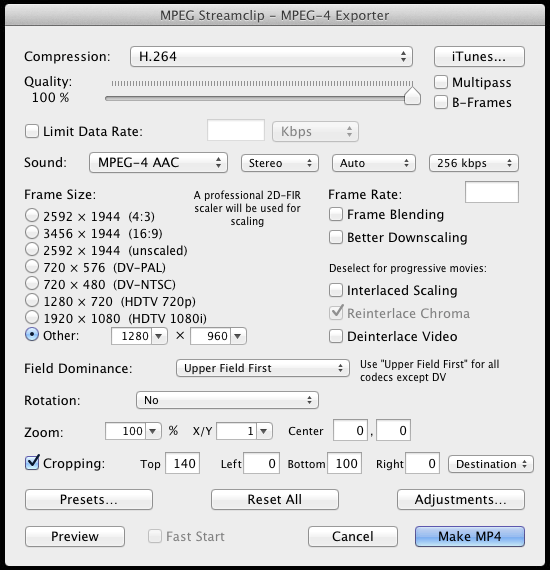
OK! Here’s the export window in MPEG Streamclip, where you can see I’ve set the size of the video to “Other” and plugged in the 1280 x 960 values. I then put the 140 and 100 values in the top and bottom crop boxes, respectively. All the other settings are what I typically use for MPEG Streamclip. (The one thing I tend to change which isn’t show here is the ‘Limit Data Rate’ value. But that’s a post for another time. Oh, I didn’t do it here, but you can disable the audio track as well.)

Here’s our final video output at 1280 pixels wide by 720 pixels high. Now, since we started with a video that was 2592 pixels wide by 1944 pixels high, we could actually get all fancy and just select a portion of the video to output at the final resolution. This involved a lot more math, but it’s a possibility, so I’ll leave it up to you to explore.
Now go make some time lapse videos!