Categories
Uncategorized

NeoPixel 7 Segment Display (Part I)

I had been looking for a 7 segment display for a project and the ones I found were similar to the ones I used about six years ago… Had things not really changed since then? Eventually I found these on Tindie, which seemed like they could work, except they were out of stock, and they were a kit of SMT components, and I didn’t want to hassle with all of that.

But what I did like about them was the Arduino library, which supported using NeoPixels for a large multi-digit 7 segment display. Someone pointed me to this Ninja Timer: Giant 7-Segment Display but that too appeared to be way too much to take on. Instead, I went a different route. (Note: I’m going to use the term “NeoPixel” even if I mean WS2812 for the rest of this post.)

Instead of using the flexible NeoPixel strips, I planned to use these NeoPixel sticks. They have mounting holes, so no need to hot glue them down or 3D print some holder. I just laser cut a plate to hold them. I did need to solder them together, and while it wasn’t the easiest thing it also wasn’t too painful.

So hey, getting 7 sticks attached to a plate and soldering them together? That was the easy part. Well, the code was also the easy part. I loaded up an Arduino UNO, connected the segment with three pins, and bam. We’ve got numerical success.

Now, there’s more to come, of course… I next made a front diffusion plate. I started by laser cutting a piece of black acrylic and sticking a piece of white vinyl to it.

I know there needs to be a midsection with walls to isolate each segment, I just haven’t got that done yet… I did get a little ambitious and did a test print without properly measuring everything and it showed I should totally measure everything. I should also note this is the maximum size I can print a single object on my Prusa MINI.

Now, the white vinyl was just a test. The idea was to use translucent white acrylic as a diffuser. The plan is to cut the black front panel, then cut the white diffusion segments so they fit perfectly into the holes when the panel is flipped over and the angled kerf of them makes the magic happen with the two pieces mating together. This worked. What didn’t work was the acrylic I got, which was 32% translucent. I got some 55% translucent later and that worked much better. (Photos of that will be in the next installment.)

At this point, there are many pieces that work, but not all the pieces. Seems I got a bit busy with some projects for customers and had to put things on hold. So I figured it was worth writing up where this project stands so it will remind me to finish it at some point.

Categories
Uncategorized

What When Words Are Our Art

I am not a perfect human, and I have many flaws. One of these flaws is that sometimes I fail to recognize the efforts that someone makes and focus instead on the mistakes they made. When I say “mistakes” I am speaking of typographical (or related) errors in the publishing realm. First, a disclaimer. I’ve worked in publishing for over 30 years, and I also really, really, like to get things right. (I’ve even served as a Technical Editor for two books. And I still make mistakes!)

But when someone volunteers their own time to help promote something (good) and I point out the errors, I think I am being helpful… but I also need to remember there is a human on the other end of my feedback.

After a recent incident, a friend sent me the image above. Here’s where my brain does weird things. When I saw the word “hykoo” my brain did not translate it to “haiku” and I assumed it was a non-English word. Of course it’s just a phonetic spelling of haiku. Yeah, it took me a minute.

I think my friend thought I might be annoyed by this image, but I see it as art, and in art, there are no rules besides those the artist creates for themselves. I like the image you see above.

This one’s a classic! Did I mention I have a degree in Graphic Design? Well, I do. This will piss off all of your designer friends! Except, not really. It won’t. Not if they are good designers. As a designer, I recognize this was designed. I realize a designer made conscious decisions about how to space everything. The kerning and leading are not accidents, or defaults that were not adjusted by someone. The use of white space in this piece is quite good. This is all deliberate, and it works really well. (Except for the idea that it will piss off your designer friends.)

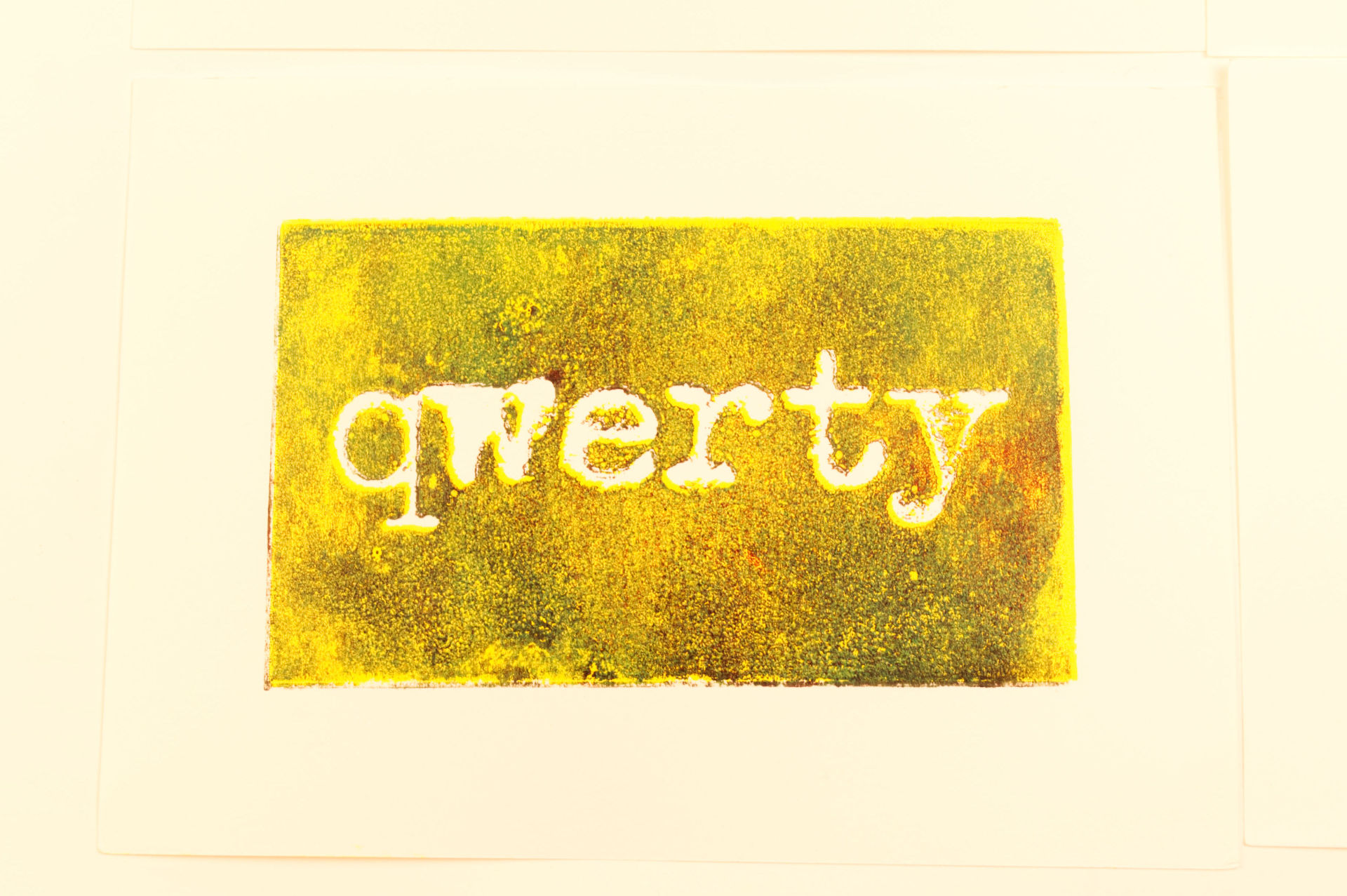
Here’s a recent print I created. The type is a bit distorted, and it may be difficult to read. That’s okay. This is a piece of art. Communicating the message is not the only purpose of this piece. In other forms of publishing communicating something as clearly as possible is probably the number one goal, and with that in mind, avoiding errors (typographical or otherwise) and creating a message that is clear, concise, and well written is what most people probably prefer.

But what do I know? I’m just a hack. (Also, let me know if there are any typos or other misteaks in this post.)

Categories
Uncategorized

QLab Four Button MIDI Controller

I was contacted by a QLab user who wanted a custom controller. He wanted a device with a 5 Pin DIN MIDI output and rectangular buttons for go, stop, next, and previous. It was a bit of a rush as well, and since he wanted something similar to the MIDI Controller 4 Button LC I had previously built, I started with that as the base.

I did up a quick sketch to make sure I knew what I was building (mainly to determine button spacing) and then got to work making it. We just used four different MIDI noteOn events for the buttons. I should also note that while USB is used to power the device it can also operate as a USB MIDI device. This means you can choose between the 5 Pin MIDI output, or the USB MIDI output, or use both… going to two different computers even. I think that’s a nice feature.

The one snag on this project (which I blame on doing it very quickly) was that I accidentally swapped the position of the red and green buttons! I did not notice until it shipped, and offered to correct it if needed. It turned out it was very easy for the recipient to pop off the red and green covers and swap them on his end. Problem solved!

The one other think I did here was separate the cover from the enclosure so it could print separately, which makes it a bit more modular of a system for future changes, and also allows printing without support. So, less material, and faster production. Nice. The black screws on the top are also a good fit.

We also used a USB-C connection for this one. I’m normally not a fan of USB-C but if requested it’s certainly an option that can be provided.

Do you need a custom controller? Get in touch with me!

Categories
Uncategorized

City of Milwaukee 1969

City of Milwaukee 1969

It probably took me a year to find one of these within walking distance of my house…

Categories
Uncategorized

Synth Setup for Maker Faire Milwaukee 2022

For Maker Faire Milwaukee this year I was not a producer, crew, volunteer, or even a Maker… I signed up as a “Performer” and asked to be placed in the Dark Room where I could make synth & drum noise as much as I wanted to. I signed up under the moniker NoiseMaster 3000 which I used (along with Maks and Dustin) back in 2017.

Now, originally MFMKE was supposed to be at State Fair Park again, and in the past the Dark Room was filled with all sorts of crazy things. Noisy things, light up things, weird things, etc. So I figured I would fit right in. (Note: Back when I was a producer I would get local modular synth people to come and make noise in the Dark Room. I figured this time it was my turn.)

Well, the venue changed to Discovery World, and I was told there would still be a Dark Room. And… there was. Sort of. It was a theater, and the only other exhibit was Mark’s Sand Table, Arrakis. (And that was a last minute addition!) So it was really just me… in the Dark Room… alone.

It was fine. The second day Matt convinced me to bring Overhead Makey (one of my most successful exhibits) and I did, and it was grand. I also realized the Dark Room used to be full of stuff because I’d add at least a half dozen exhibits to it in the old days!

Anyway, I’m here today to talk about the setup, so let’s get to it!

I mentioned to someone that I’ve never taken all of this stuff out of my house before, and I’ve never actually connected it all together at once. Saturday was okay, but after screwing around with things all day I wanted to change a few things, so at the end of Saturday I ripped everything apart to reconnect it fresh Sunday morning.

What you see in the photo is what I had set up on Sunday when the Faire opened, and it pretty much remained that way all day. If Saturday was about figuring things out, then by Sunday I had things pretty well figured out.

In the photo above you’ll see the Behringer RD-6 Drum Machine, the Behringer TD-3 Bass Synthesizer, and the Behringer Crave Analog Synth. I sync’d these three together with the RD-6 setting the tempo. The RD-6 can very much be played/tweaked on the fly while it’s running, but the TD-3 not so much. I basically chose between patterns I had created and stored in the past. The Crave was connected to the TD-3 via MIDI so it was getting notes from the TD-3. That worked out fine since the Crave is all about twiddling those knobs to adjust the sounds coming out of it. And twiddle I did. I also invited others to twiddle.

Those three each had their own channel on the mixer. This made it easy to isolate them to explain to people which was making which sound, and I could set it to just output one of them, then show how that one worked.

Next up is the Korg Volca Sample 2, which was on mixer channel 4. (Note: The first day I did not have a cheat sheet to tell me what was on what channel, and mistakes were made.) Since the Sample is sort of a “budget groovebox” it can do quite a bit all on its own. I think on Saturday I had it sync’d to the RD-6 for a bit, but honestly having it separate was a good idea because I could have a totally different thing going on with it, and it was my “Second Setup” after the Behringer Trio above. The Sample 2 is definitely a thing that you can play live and perform with. In fact, that’s pretty much the only way I use it now, to build up a beat over time, slowly adding to it, and playing live by knob twiddling and button pressing.

We’ve got the Korg NTS-1 which is a fine little digital synth and effects box. I connected up a small device I made that generates 16 step patterns and then sends them out via MIDI. So basically this was running spacey sounds and every now and then I would generate a new pattern. I tend to mess with the effects and add chorus, flanger, delay, and other weird stuff. Sometimes I would run this on top of other things, like the output of the Behringer Trio, other times I would just run it on its own.

I forgot to mention the Monotrons! The Korg Montron Delay and the Korg Monotron Duo fed into a splitter (in reverse, so a combiner I guess) and joined in with the NTS-1. To be honest I didn’t mess with the Monotrons too much. They are fun, and the Delay is a nice little effects box, but I guess I just focused on the NTS-1 more.

We’ve got the Pocket Operator Crew in the lower right corner. Those feed into a Bastl Dude mixer, which I love using with the PO gear so I can do punch-in/punch-out and adjust levels individually. I pretty much just ran four sixteen step patterns on the drums and then messed around with the bass, office, and factory live. (Note on the Factory, I need to make a 3.3v power supply because batteries suck in that thing and constantly die. Rechargeables do not work, and Alkalines do not last.)

All of the Pocket Operators use a Sync Splitter so I can plug each output into the Dude mixer. I’ve explained the Sync Splitter before

Here’s a Moukey 6 channel mixer that everything ran into. I then had a splitter coming out of it so I could run to the amp and to my headphones, and to the old Zoom recorder I had to record everything. (Yeah, I’ve got over 10 hours of audio!) I wasn’t able to lower the input to the Zoom on the Zoom so I set the output from the mixer to a good level and then adjusted the master output volume on the amp. (Note: There is an 8 channel Moukey mixer. I should consider getting one of those for the additional two channels.)

Speaking of the amp (if you can call it that!) I used an old car amplifier I had lying around, paired with some old stereo speakers that had been sitting in the basement for years. Everything is mono so stereo is a bit of a misnomer here. This setup worked pretty well. I didn’t need to be super-loud but could get plenty loud for the quiet theater I performed in. Oh, I managed to fit all of my gear into a suitcase and the speakers took up half the space!

You can’t run all this gear with a lot of POWER!!! Just kidding, I do have a lot of wall warts but I was probably pulling well under 5 amps, maybe under 3 amps. (And all the Pocket Operators and the Dude were battery powered. I did plug in the Volca, though it could have run fine on batteries) It’s a bit of a mess, of course, and there’s another power strip out of view for the light, battery chargers, and one synth.

I did bring the Arturia BeatStep and tried to use it a bit on Saturday but by Sunday I just put it to the side. I sort of ran out of room and I didn’t get it connected in a way I liked. I may need to make note of how some things get connected for the future. I do like the BeatStep for screwing around, as demonstrated in this video.

Finally, there was a small scrap of paper to remind me what devices were on what channels of the mixer. With all this gear, I got confused a few times on Saturday, so the cheat sheet worked well. I basically had four sequences running at once and could switch between them which made things a lot of fun. If I ever do this again (?!?!?) I’d probably do something very similar.

Okay, I hope you enjoyed this (very) lengthy write-up about my set-up. As I mentioned this is my first time doing this, and overall I was pleased with how it went. It was a super-low pressure gig where I could just have a good time. Cheers!