Categories
Uncategorized

Big Button Audio Player

I was recently contacted by an artist who really liked The Big Button and wanted to use it for an art installation. After some discussion it turned out they really didn’t need a USB controller but needed something to trigger an audio player. When I asked what they were going to use for an audio player they said they didn’t know, so I suggested building the whole thing to ensure it would all work together. And it did.

The control box (which is the “audio player” in the simplest terms) allows the button to plug into it using a 3.5mm TRS cable. This allows the customer to swap out to a longer or shorter cable if needed. 3.5mm TRS stereo cables are everywhere and pretty cheap. Since we only need three wires there’s no need for a more complex connection. (Though if you need an RJ-45 solution, we’ve got that covered.)

The control box also has a 3.5mm jack for audio out. This is to connect to external powered speakers or a PA system. (Or headphones!) And in the center of the front panel is a Mini USB jack for powering the unit via a Mini USB cable and a 5 volt wall wart.

There’s a hole on the side of the unit for access to the Micro SD card in the audio player. Just in case sounds ever need to be changed, or if the card fails, etc. Without this hole it would be very difficult to get to the card. (Just like the Game Show Buzzer System I covered the hole with tape before shipping.)

Here’s a look inside the unit. There’s an Arduino Nano with the audio player, and the 3.5mm jack and… some wires! And a few wire connectors taped together just to prevent them from rattling. This was a quick build but it came together fairly easily. I did a good amount of testing with this one, and luckily it all went well. (I should really build a permanent testing station again, as it’s becoming of a need lately.)

So hey, if you need some weird electronic device that does something… let me know!

Categories
Uncategorized

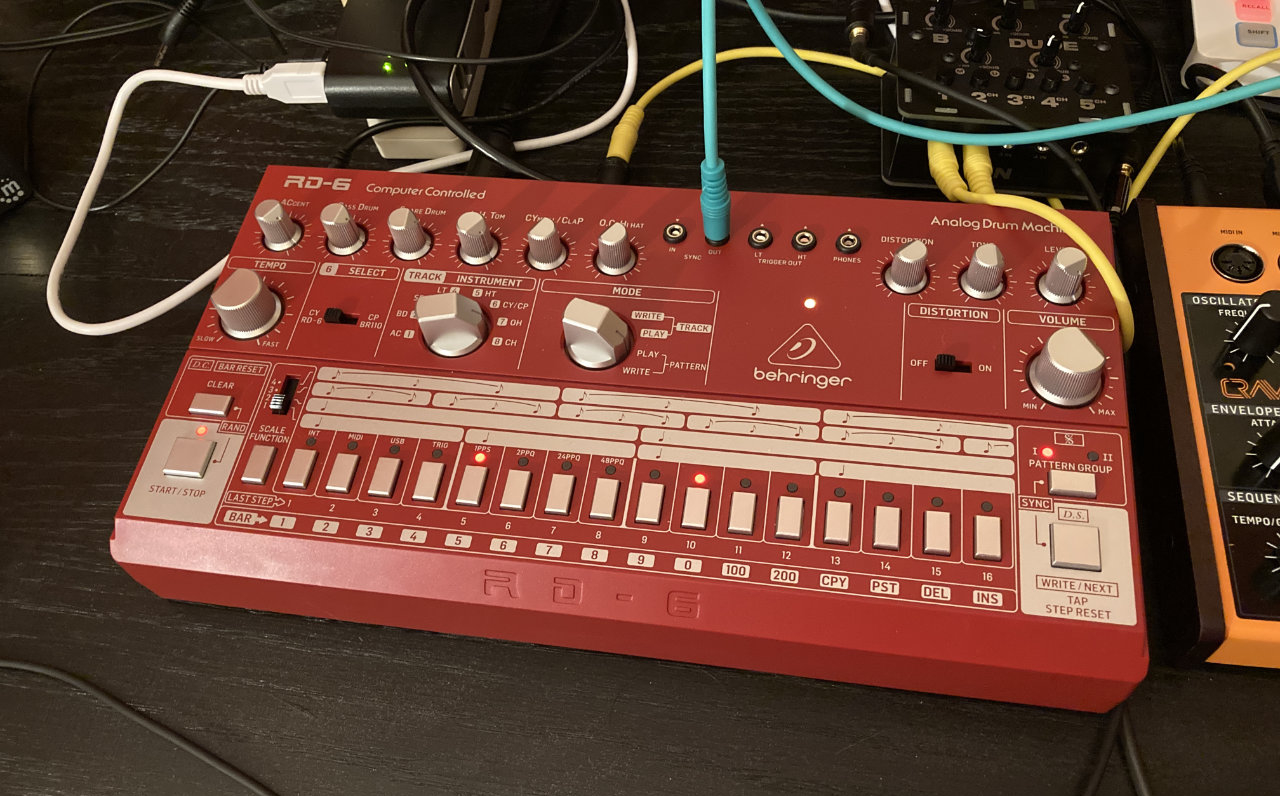
Syncing a Behringer RD-6 to a Pocket Operator via a Pi Pico

Hello! Check out the post Sync a Behringer TD-3 to a Pocket Operator for additional info, including a diagram.

The full title of this should be Syncing a Behringer RD-6 Analog Drum Machine to a Pocket Operator PO-14 Sub with a Raspberry Pi Pico Microcontroller. That’s a bit long, but it’s also descriptive. The RD-6 can be synced via MIDI, but the Pocket Operators do not do MIDI. The RD-6 does have an analog sync in which will trigger at over 2.5 volts, but the Pocket Operators output about 1 volt when they sync with each other.

I’d seen a few ideas and potential solutions online. One involved a DC boost converter, so I tried one but it didn’t work. Another involved using an overdrive guitar pedal, but I don’t have one…

What I do have are a bunch of Arduino boards of various types. I originally grabbed an Arduino Nano with the idea that I could capture the PO-14 output at 1 volt with an analog pin and then output a pulse on a digital pin as a trigger. The Arduino outputs at 5 volts though, and while I don’t mind making a voltage divider, I also had a Teensy LC on my desk, so I tested with that since it runs on 3 volts. And then, since my desk is fairly large, I grabbed a Raspberry Pi Pico microcontroller which also runs on 3 volts. I used the same Arduino code on the Pico as the Teensy (thanks to the work of Earle F. Philhower, III).

This is literally all there is to the code. I added an LED which blinks when a pulse is read, and then I just connected the signal wire to the same pin as the LED (and the other to ground) and plugged those into the sync in of the RD-6.

I’m new to all this syncing of musical devices, and this may be the wrong way to do it, but it worked for me. I did try to set the RD-6 as the master device and sync the PO-14 to it, but it didn’t seem to work quite right. The voltage may be a bit too high causing erratic behavior on the Pocket Operator.

Since this works, I’ll probably stick with it unless someone tells me it’s a terrible idea or tells me a better way to do it that is cheap, easy, or involves things I already have.

Enjoy the demo video below!

Categories
Uncategorized

Game Show Buzzer System

I recently completed a build for a client that I’m calling a “Game Show Buzzer System” because, well… that’s what they asked for. The requirements were a system with two buzzers, green and red, that when pressed each played a different sound. They also wanted a light controlled, as they were going to build this all into a podium for some game show broadcast on the Internet.

At first they asked for colored light strips, so I was going to use NeoPixels, but then they switched to wanting to control a DMX light. I didn’t have a DMX light handy so I got the cheapest one on Amazon to start doing development with. Meanwhile they shipped me a very nice professional DMX light. I got the code working on my cheap light, but once moved over to the good light it didn’t work without some tweaking. Different DMX lights operate differently, duly noted.

The electronics live in a 3D printed enclosure. This probably took more time than the code. (But since code is often reused, that’s not surprising.) This project came together pretty quickly, but if it hadn’t I probably would have spent more time on the enclosure. It’s not bad, it just has a few things that annoy me about it. Everything is labeled, which is good, because it is possible to plug the 3.5mm plugs into the wrong place.

The top features a knob and small display which are used to set the reset time for the unit after a button is pressed. The client thought that 30 seconds for the reset might be good, but while discussing it there was concern that might be too long, so I suggested a way to adjust it.

The large buttons use 3.5mm jacks and cables to connect. Since TRS cables have three connections, they’re perfect for items with GND, a button, and an LED. This also allows for the client to easily swap cables if these are too long or too short.

The client provided the sounds. (Well, links to YouTube videos with the sounds.) If they ever want to replace the sounds, or the SD card fails, it can be easily accessed. I didn’t have time to make a door or panel for this, so I covered it with gaff tape before I shipped it.

A peek at the inside. It’s a little tight, but there’s a lot going on in there. I ended up making my own “shield” to connect everything because, this was a rush project, but it all works, even if it’s not the prettiest thing I’ve built. I did about 4 days of testing before shipping it out. It all works, and it was a fun and challenging build. Neat!

Categories
Uncategorized

Sleep Report for July 2021

July looks good by the numbers.. 100% compliant, which means I used my CPAP machine for at least 4 hours each night. While using the machine while sleeping is the goal, it doesn’t mean that I’m getting good sleep, or enough sleep.

I averaged 6h15m of sleep per night in July (June was 6h36m and May was 7h06m). While these numbers are good, I know that in reality I often lie awake in the morning, mask on, unable to sleep. It’s often around 4:30am or later, which means I’ve got my 4 or 5 hours of sleep, but then I’m not sleeping buy still masking. Often I give up by 5am, get up and… go lie down elsewhere in the house. I don’t fall asleep again, even though I’m still pretty tired.

Lately when I’m up at 5am I make some Pocket Operator jams, so at least I can be creative, do something I enjoy doing, and not just stare at my mobile and scroll the morning away.

Categories
Uncategorized

Pocket Operators

I’m kind of in love with the Teenage Engineering Pocket Operators. I first saw one a few years ago. One of the guys I worked with at the time had one on his desk and I picked it up, pressed a few buttons and was like “Meh, I don’t get it.” Honestly it seemed like a toy, and kind of difficult to use. Both are true, and false.

The Pocket Operators are serious little machines capable of producing some amazing sounds. Part synthesizer, part sequencer, with the ability to sync with each other and with other devices, they’re just a ton of fun. I’ve only been playing around for a few weeks, but I’m hooked. And yes, they do look like “tricked out calculators” as Dana describes them.

They are pretty minimal as far as the user interface, which keeps them pretty cheap. There are 23 buttons, 23 LEDs, and two potentiometers, and a little one-color LCD screen which does not light up (so using them in the dark can be a little difficult). Through these inputs and outputs you can program sequences, adjust all sorts of parameters, create and replay patterns, and tweak the hell out of it.

I grabbed the PO-12 Rhythm model (which is “drums”) last month and had so much fun with it that after a few days I grabbed a PO-14 Sub (which is “bass”) to go along with it. They all operate somewhat the same so (to a certain degree) once you learn to use one, you can use others.

At first I was a little disappointed in the PO-14 Sub, I think because the PO-12 Rhythm was so awesome, but it just took a little more time to discover the awesomeness of the Sub, which also has a mini-drum sequencer built into it. Teaming them up together is also pretty cool.

Also, these things are super-portable, run on AAA batteries that should last a year or two, and work great with headphones. I’ve got a bit of a synth setup happening in my home office, but being able to grab a Pocket Operator and going outside or sitting on the couch at 5am and just building up some beats is extremely satisfying.

While I used the term “building up some beats” I should say that this is actually programming. Back when I used to build museum exhibits one of the components I designed for an exhibit was a step sequencer that kids could “program” and then “run” to hear the results. We had educational information about how programming a sequencer was like programming a computer – basically telling a machine what to do. I think when we talk about kids (or adults!) learning programming, we often just jump into computers and careers and don’t look at the bigger picture.

If you are unaware, long ago I was in a number of bands, and not quite as long ago, I was recording music. I enjoyed both of those experiences greatly, and getting back into making music (if you can call this that) has really got me excited about creating again, and sort of got me past a creative block I’ve been stuck in. So, I’m actually willing to say making noise with these things has improved my mental health.

There are so many YouTube videos (and just a few blog posts) about Pocket Operators, so I’ll share a few favorites below. Again, these devices are awesome! I mean, I don’t know that I’ll get all of them but, what? Oh wait… did I just order another one!?!?